Lab 7: Flood Mapping with HAND
Civil Engineering 414 — Engineering Applications of GIS
Fall 2026 · Dr. Dan Ames
How high a river rises, and what it reaches — the Provo River at Provo
Tip
Start from the report template. lab07-report-template.docx
has the title block, a section for every deliverable, the tables already set up with the columns
the rubric asks for, and the rubric at the end ready to fill in. You are welcome to write your
report any way you like — the template is a floor, not a ceiling — but if you use it and fill in
every section, you will not have left a graded item out.
Note
This is a one-week lab. It is introduced on Tuesday of Week 8 and due on Saturday of the same week, the week of Midterm 1. Everything that takes preparation is done for you and hosted; the lab is two short models, a few tool runs and two maps.
Background
Lab 5 found where water goes. Lab 6 measured how much a lake holds at every level. This lab asks the question every floodplain manager, insurer and city engineer asks of a river: when the river rises, how far does the water reach, and what is in the way?
Answering that properly takes a hydraulic model — a river surveyed in cross-sections, the flow pushed through them, the water surface computed at each. That is what the Federal Emergency Management Agency (FEMA) paid for on the Provo River, and its new flood map took effect in June 2026. But a hydraulic model takes months for one river, and there are millions of miles of river. Two shortcuts are used instead, and this week's lectures compare them:
- The bathtub. Pick one water-surface elevation and flood every cell below it. That works for a lake (Lab 6). On a river it fails, because a river's water surface slopes downhill with the river: the Provo falls about 110 m across this lab's study area.
- HAND — Height Above Nearest Drainage (Nobre and others, 2011). For every cell, follow the water downhill until it reaches a stream, and record how far down that was. A cell with a HAND of 1.2 m sits 1.2 m above the stream it drains to, wherever on the river it is. Flood the river by a depth h, and every cell with HAND ≤ h is wet. One threshold maps a whole river, and the water surface follows the river down the valley. NOAA's Office of Water Prediction maps floods for the National Water Model this way (NOAA-OWP inundation mapping).
HAND is built from the tools you used in Lab 5 — Fill, Flow Direction, Flow Accumulation and a stream threshold — plus one new tool, Flow Distance. The depth h comes from hydrology: a flood flow, turned into a water level by the stream gage's rating curve.
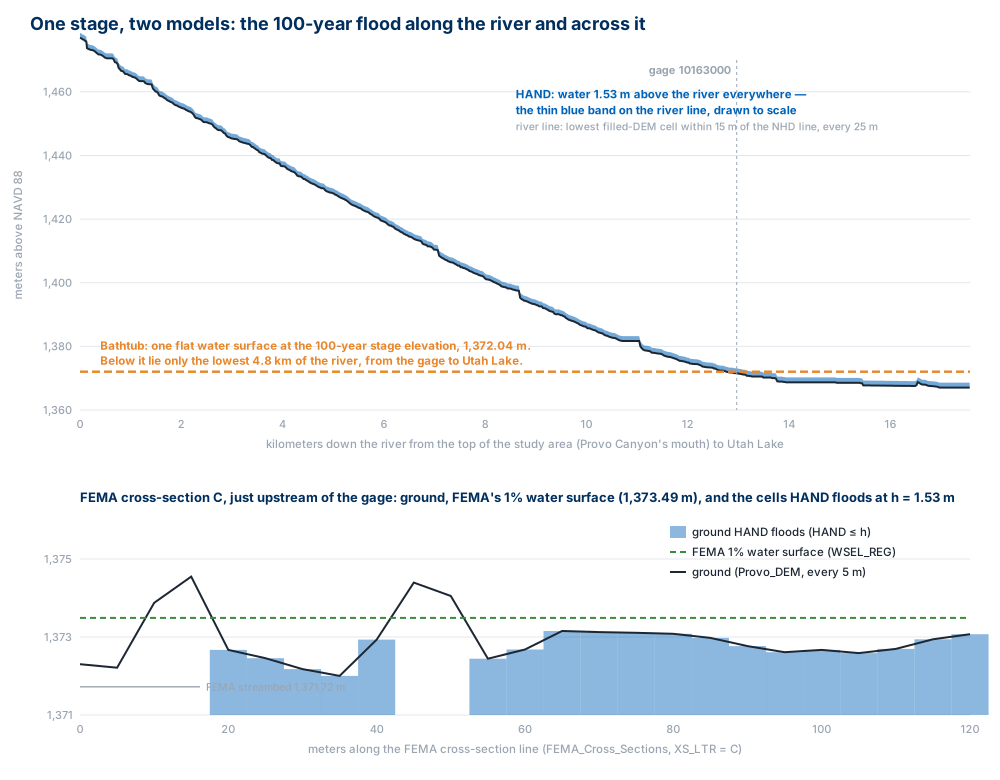
Figure B. One flood, two models, measured on this lab's data. Top: a bathtub at the 100-year stage elevation reaches only the river below the gage; HAND's water surface follows the river all the way up. Bottom: across the river, HAND and FEMA's hydraulic model agree closely here — but not everywhere, and Step 6 asks you to find where they disagree.
Important
Your job — see the deliverables below. Build a model that computes HAND for the Provo River, and a second model that floods it at FEMA's 10- to 500-year flows; count the buildings each flood reaches; compare your 100-year flood with FEMA's; map your own design flood; and test how much the answer depends on the stream threshold.
Problem Statement
The Provo River flows from the mouth of Provo Canyon through Provo to Utah Lake, past the USGS stream gage 10163000, Provo River at Provo. FEMA publishes flood flows for this reach. Using a lidar elevation model, the gage's rating curve and those flows:
- Compute the height of every cell above the river it drains to (HAND).
- Turn FEMA's 10-, 25-, 50-, 100- and 500-year flows into flood depths at the gage, and map the land each flood would cover.
- Count the buildings each flood reaches.
- Compare your 100-year flood with FEMA's 1%-annual-chance floodplain, and say where and why they differ.
Analysis Considerations
Every one of these is a decision somebody made, and every one of them can change the answer.
- The flows. FEMA's Flood Insurance Study for Utah County (revised June 23, 2026) lists the Provo River's peak flows "3 miles above tie-in to Utah Lake": 1,475, 1,810, 2,065, 2,325 and 2,935 ft³/s for the 10-, 25-, 50-, 100- and 500-year floods (10, 4, 2, 1 and 0.2 % chance in any year). These are small floods for a 673 mi² basin, because the river is regulated: every one of the gage's 90 recorded annual peaks carries the USGS code for "affected by regulation or diversion" — dams and reservoirs upstream hold back the snowmelt.
- From flow to water level. A stream gage measures the gage height, the water level above a fixed point, and the USGS keeps a rating — a table of measured flow against gage height — to turn one into the other. You look the flood flows up in that table (Step 1). The table stops at 8.00 ft and 2,150 ft³/s; the 100- and 500-year flows are above it, so their gage heights come from extending the table's top segment along the same curve (the rating is a power law in the height above 3.20 ft, so the extension is straight on a log-log plot of flow against gage height minus 3.20 ft). That is a guess, and it is flagged in the stage table.
- From water level to a HAND threshold. HAND measures height above the stream, so the flood needs a depth. This lab uses the depth of water above the rating's zero-flow level, 3.20 ft: h = (gage height − 3.20 ft) × 0.3048, in meters. One depth is applied to the whole river, as if the 100-year flood were 1.53 m deep everywhere.
- The elevation model. Hydro-flattened lidar: the river is a flat water surface at whatever level it had the day the lidar was flown, not the channel bed. HAND is measured from that surface, while h is measured from the zero-flow level. They are not the same level; Step 6 asks what that does to your floods.
- What counts as "the river." A stream is a cell with more than a threshold number of cells draining through it, as in Lab 5: 2,000 cells of 5 m, 0.05 km². Inside a city, that also makes streams of gutters and ditches, so the model keeps only stream cells within 30 m of the mapped Provo River. The threshold is the parameter Step 7 varies.
- What HAND cannot see. Levees, bridges, culverts, the speed of the water, the channel's capacity. HAND knows only the ground and which way it slopes.
- Cell size and coordinate system. 5 m cells, in NAD 1983 UTM Zone 12N, meters, so that areas are in square meters and every cell is the same size.
Data
Important
Set up your folder before you download anything. On the lab machines, work on the D:
drive: one folder for this class named after you, D:\Smith\, and one folder per lab inside
it, D:\Smith\Lab07\. The C: drive is locked, and a network drive is slow enough to make
ArcGIS Pro hang. Never use a space in a folder or file name you create — raster tools fail on
them without saying why. Back up your lab folder at the end of every session. The full set of
conventions is on the ArcGIS Tips and Reminders page.
- Download:
lab07-provo-river-hand.zip(12.4 MB). Unzip it into your Lab07 folder — the files are in alab07-provo-river-handfolder inside it — and readREAD-ME-FIRST.txt.
| Layer | What it is |
|---|---|
Provo_DEM.tif |
Bare-earth elevation, meters above NAVD 88, 5 m cells, from USGS 3D Elevation Program lidar |
ProvoData.gdb\Provo_River |
The Provo River from the National Hydrography Dataset, as served by the Utah Geospatial Resource Center (UGRC) |
ProvoData.gdb\Gage |
USGS stream gage 10163000, Provo River at Provo |
ProvoData.gdb\Stage_Table |
FEMA's five flood flows, each turned into a gage height and a HAND threshold (H_M, meters; H_CM, whole centimeters) |
ProvoData.gdb\Buildings |
Building footprints within 1 km of the river (UGRC, from Microsoft's computer-vision footprints) |
ProvoData.gdb\FEMA_Floodplain_1pct |
FEMA's riverine 1%-annual-chance flood zones (A, AE, AE floodway, AH) in the comparison area |
ProvoData.gdb\Comparison_Area |
Where you compare with FEMA: within 500 m of the river, minus FEMA's Utah Lake shoreline zones |
ProvoData.gdb\FEMA_Cross_Sections |
FEMA's 43 Provo River cross-sections: 1% water surface (WSEL_REG) and streambed (STRMBED_EL), feet NAVD 88 |
rating_10163000.csv |
The gage's rating: gage height (ft) and discharge (ft³/s), 3.42 to 8.00 ft |
peaks_10163000.csv |
The gage's annual peak flows, 1903 and 1934–2024 |
| Monitoring location 10163000 | The gage's live page at the USGS — waterdata.usgs.gov |
What we already did for you. Each of these would cost an evening and teach little that you have not done before:
- Read the elevation from the USGS 3DEP elevation service at 2 m, over an 8.6 × 10.6 km box from the mouth of Provo Canyon to Utah Lake, and resampled it to 5 m (bilinear). Nothing else: no filling, no smoothing.
- Selected the Provo River from UGRC's NHD streams, the buildings within 1 km of it, and FEMA's riverine flood zones and cross-sections from FEMA's National Flood Hazard Layer.
- Built the stage table. For each FEMA flow: the first row of the rating whose discharge is at
least the flow gives the gage height; the gage height minus 3.20 ft, in meters, is
H_M. You check one row yourself in Step 1.
Tip
Check the data: Provo_DEM.tif is 1,718 columns × 2,124 rows of 5 m cells, 1,366.78 to
1,645.53 m, NAD 1983 UTM Zone 12N. Buildings has 11,122 footprints, FEMA_Cross_Sections
43 lines, Stage_Table 5 rows. Provo_River is one feature in two parts, 17.57 km long.
RETURN_YR |
Q_CFS |
GAGE_HT_FT |
H_M |
H_CM |
RATING |
|---|---|---|---|---|---|
| 10 | 1,475 | 7.11 | 1.192 | 119 | within table |
| 25 | 1,810 | 7.58 | 1.335 | 134 | within table |
| 50 | 2,065 | 7.90 | 1.433 | 143 | within table |
| 100 | 2,325 | 8.21 | 1.527 | 153 | extrapolated |
| 500 | 2,935 | 8.89 | 1.733 | 173 | extrapolated |
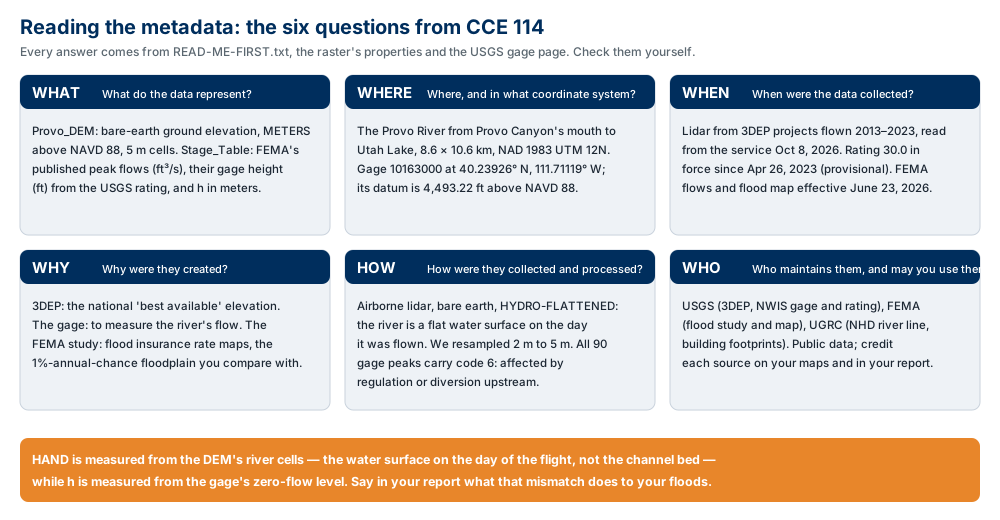
Figure A. The six metadata questions, applied to this lab's data. Confirm three values yourself —
the gage datum (on the gage's USGS page,
which tells you what to add to a gage height to get an elevation), the date of the rating, and the
effective date of FEMA's flood study — from the gage page and READ-ME-FIRST.txt, and say in your
report what each one does to your result.
ModelBuilder Tools
New in this lab:
| Tool | What it does |
|---|---|
 Flow Distance (Spatial Analyst) |
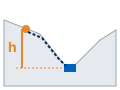
For every cell, the distance along its flow path to the stream it drains to. With Vertical, the height above that stream: HAND. Tool reference |
 Iterate Field Values (ModelBuilder ▸ Iterators) |
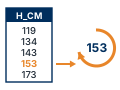
The loop, like Lab 6's For, but its values come from a field of a table: here, one HAND threshold per return period. Tool reference |
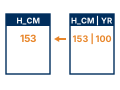 Join Field (Data Management) |
Copies fields from one table onto another where a key field matches: the return period onto each flood. Tool reference |
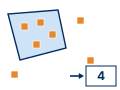 Spatial Join (Analysis) |
Writes onto each feature what it touches: here, the number of buildings each flood reaches, in Join_Count. Tool reference |
Tools you already know: Fill, Flow Direction, Flow Accumulation (Lab 5), Raster Calculator with a model variable (Lab 5), Buffer and Extract by Mask (Lab 4), and the loop pieces from Lab 6 — Raster to Polygon, Calculate Field, Collect Values and Merge. Step 6 also uses Pairwise Clip and Pairwise Intersect.
Example Model
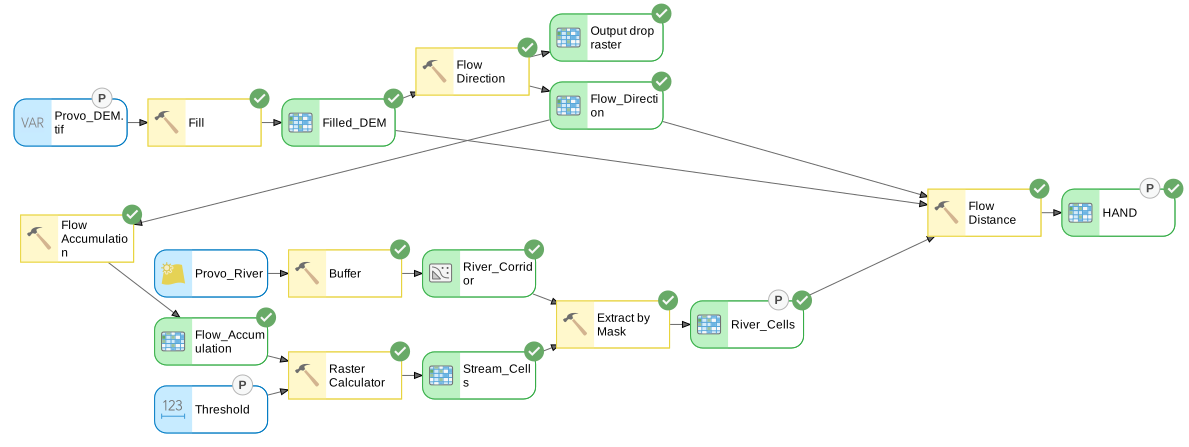
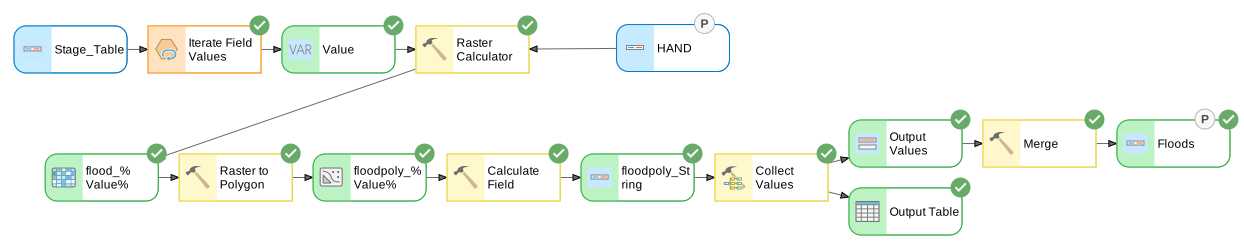
Figure C. The two models, exported from ModelBuilder (Export ▸ Export To Graphic) after a run. The first computes HAND once; the second floods it once per row of the stage table. They are two models because a model with an iterator runs every tool in it once per value (Lab 6, Step 6): in one model, Fill, Flow Direction, Flow Accumulation and Flow Distance would all run five times.
Complete the Lab
For an advanced GIS student, the information up to this point is all you need to complete the assignment. Feel free to try the analysis using only the information above. If you complete the lab without the step-by-step instructions below, say so in your report.
Step-by-Step Solution
Note
Every check value on this page was measured on the files you download, with the settings below, in ArcGIS Pro 3.7.1, and your numbers should match to the last digit shown. On a laptop, the HAND chain ran in about a minute inside ModelBuilder, and the flood loop in under a minute.
Step 0 — Set Up the Project
- Create a new project named
Lab07inD:\Smith\Lab07\with the Map template; if you already made the folder, uncheck Create a folder for this local project. ArcGIS Pro makesLab07.gdbandLab07.atbxbeside it. The downloaded data stay in their own geodatabase,lab07-provo-river-hand\ProvoData.gdb. - Add
Provo_DEM.tif(click OK to build pyramids and statistics) and, fromProvoData.gdb,Provo_River,Gage,Buildings,FEMA_Floodplain_1pct,Comparison_AreaandStage_Table. Add an imagery basemap. - Confirm Spatial Analyst is licensed (Project ▸ Licensing).
- On the Analysis tab click ModelBuilder. On the ModelBuilder tab click
Properties, set Name to
HANDBuilderand Label toHAND Builder, and save. - On the ModelBuilder tab click Environments and set:
- Current Workspace and Scratch Workspace: your project geodatabase,
Lab07.gdb - Extent: choose
Provo_DEM.tiffrom the list of the map's layers - Snap Raster:
Provo_DEM.tif - Cell Size:
Provo_DEM.tif(or type 5)
- Current Workspace and Scratch Workspace: your project geodatabase,
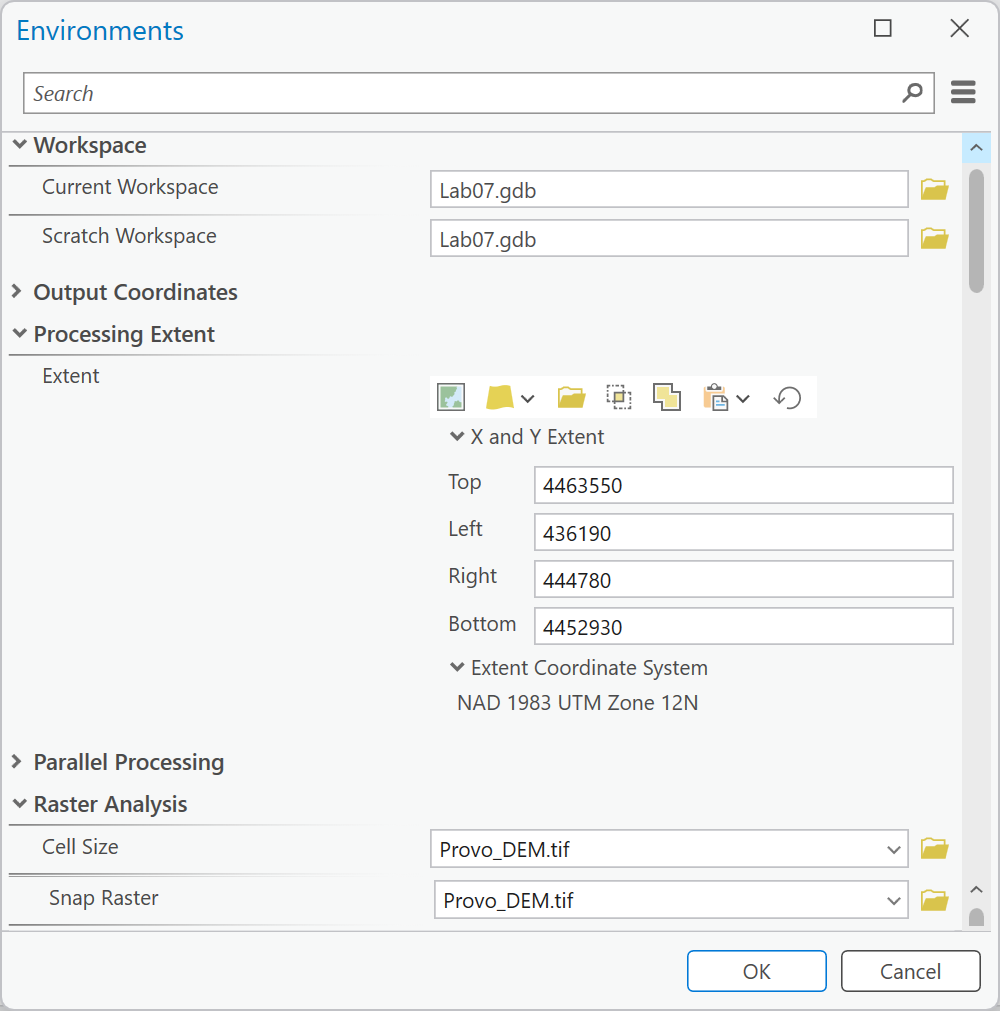
Figure 0. ModelBuilder ▸ Environments. Choosing Provo_DEM.tif for the Extent fills in its
four edges; if Output Coordinate System comes filled in from an earlier project, clear it.
Warning
Set the Extent. Without it, Extract by Mask (Step 3) makes River_Cells only as large as the
box around the river corridor, Flow Distance (Step 4) follows it, and HAND covers 695,974 cells
instead of 697,608: the edges of the valley drop out, with no error.
Step 1 — Read the Gage
Before any GIS, check where the stage table came from. Open
the gage's page and
rating_10163000.csv (Excel is fine).
- On the gage page, find the datum: the number to add to a gage height to get an elevation.
It should match
READ-ME-FIRST.txt: 4,493.22 ft above NAVD 88. - Verify the 25-year row by hand. FEMA's 25-year flow is 1,810 ft³/s. Find the first row of
rating_10163000.csvwhose discharge is at least 1,810, read its gage height, and compute:- the water-surface elevation: 4,493.22 + gage height, in feet, then × 0.3048 for meters;
- the HAND threshold: h = (gage height − 3.20) × 0.3048, in meters.
- Open
peaks_10163000.csvand look at thepeak_codecolumn (the 1903 peak reads6,Bd: code 6, and its day is not known).
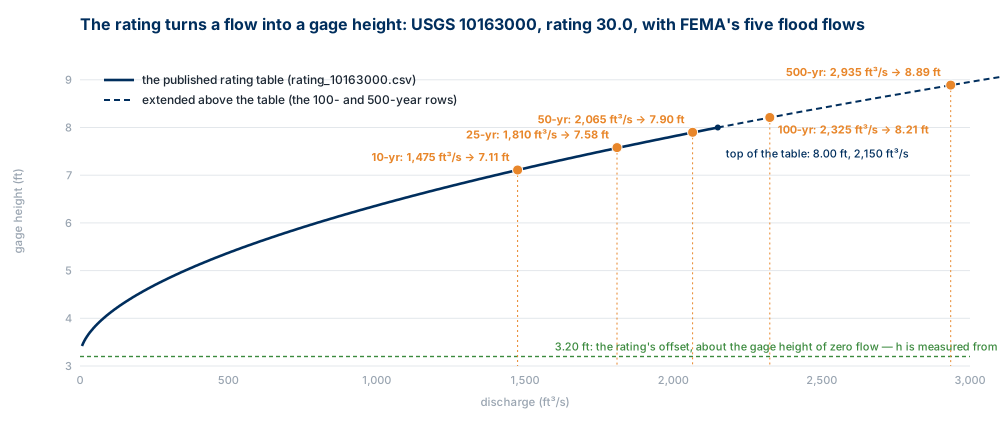
Figure 1. The rating turns a flow into a gage height. FEMA's 100- and 500-year flows are above the top of the published table.
Tip
Check the result: the row at 7.57 ft is 1,809.84 ft³/s — just short — so the answer is
7.58 ft (1,817.45 ft³/s). Elevation 4,500.80 ft = 1,371.844 m; h = 4.38 ft =
1.335 m: the Stage_Table row for 25 years, H_CM 134. Every one of the 90 peaks has code
6, "affected by regulation or diversion."
Note
Two 100-year floods. We also fitted a Log-Pearson Type III distribution — the standard flood-frequency curve — to the gage's own annual peaks, a teaching approximation of the USGS method (Bulletin 17C), not a published estimate. The 100-year flow came out 3,111 ft³/s from the 32 peaks of 1993–2024, after Jordanelle Dam was finished upstream, and 2,827 ft³/s from all 89 peaks since 1934; FEMA's is 2,325 ft³/s. Your report says, in a few sentences, why two careful estimates of "the 100-year flood" at the same gage can differ this much, and which you would design to. (Look at the peak codes, the record lengths, and what upstream dams do to a flood.)
Step 2 — Condition the Surface
In the HAND Builder model, as in Lab 5:
- Fill: input
Provo_DEM.tif, outputFilled_DEM. Right-click theProvo_DEM.tifoval ▸ Parameter. - Flow Direction: input
Filled_DEM, Flow direction type D8, outputFlow_Direction.
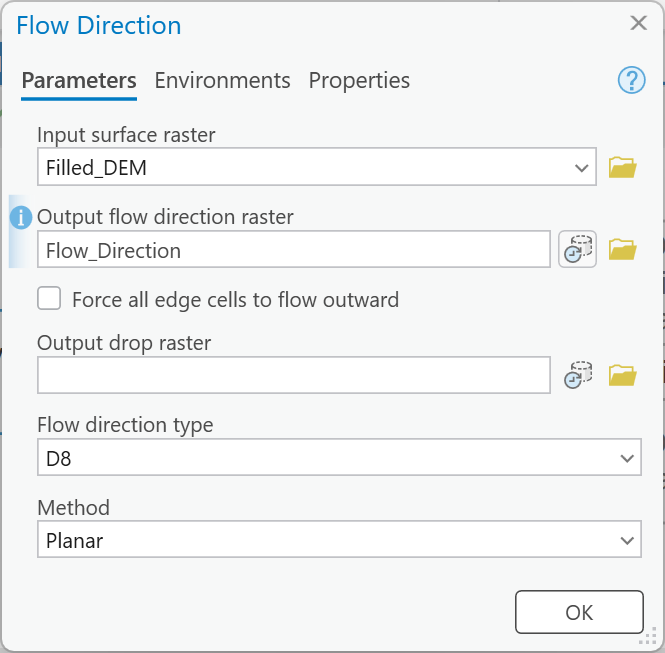
Figure 2. Flow Direction at its defaults: Force all edge cells to flow outward unchecked, D8, Planar.
Tip
Check the result: Filled_DEM runs from 1,366.92 to 1,645.53 m. Fill raised 489,125
cells (12.23 km² of the box), by up to 8.47 m: the city is full of hollows — underpasses,
basins, low yards — that the bare-earth surface shows as pits. Flow_Direction holds only the
eight D8 codes, 1 to 128.
Step 3 — Find the River
- Flow Accumulation: input
Flow_Direction, outputFlow_Accumulation(accumulation data type Float). - On the ModelBuilder tab click Variable, type
Long, and click OK. Right-click the new oval ▸ Rename ▸Threshold, double-click it and type2000, and right-click it ▸ Parameter (the same steps as Lab 5's Step 12). - Raster Calculator:
Con("%Flow_Accumulation%" > %Threshold%, 1), outputStream_Cells. With no third argument, every cell that is not a stream is NoData. - Buffer: input
Provo_River(fromProvoData.gdb), distance 30 Meters, Dissolve Type Dissolve all output features into a single feature, outputRiver_Corridor. - Extract by Mask: input raster
Stream_Cells, maskRiver_Corridor, outputRiver_Cells. MakeRiver_Cellsa parameter, so that the tool-dialog runs of Step 7 keep it.
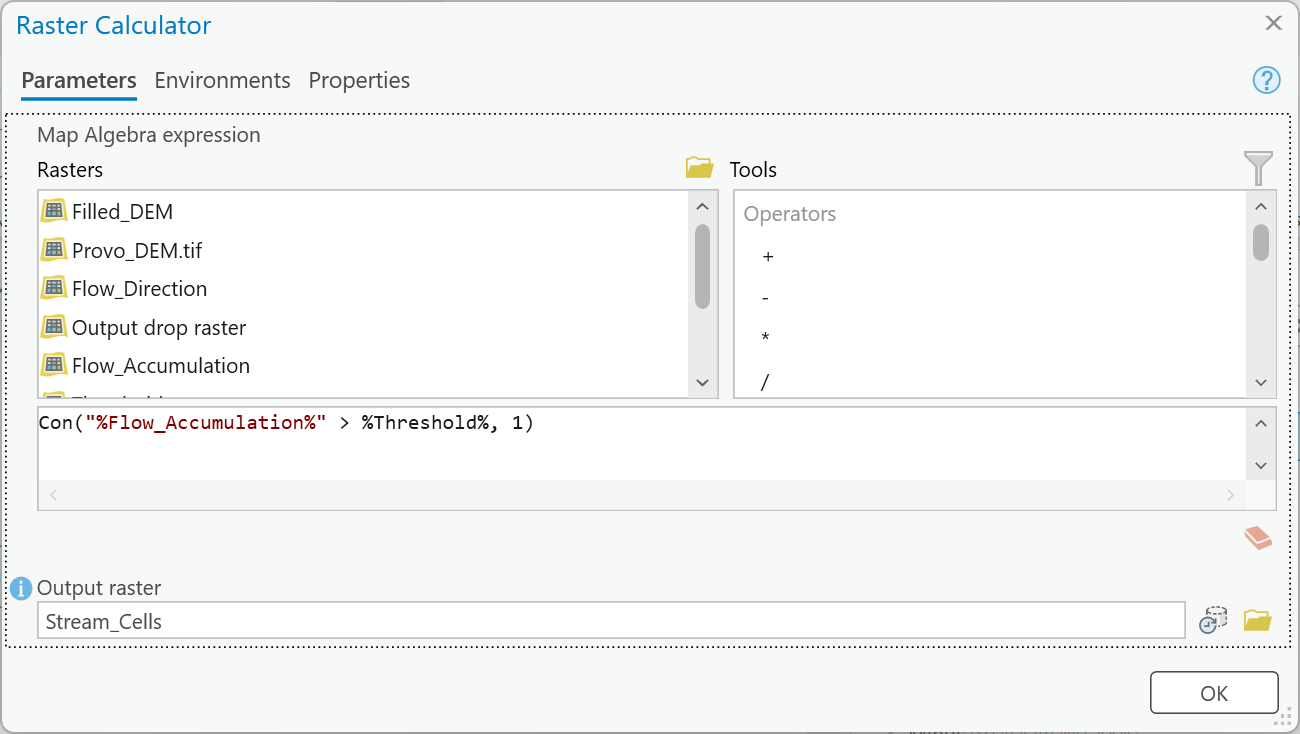
Figure 3a. The stream threshold. Double-click Flow_Accumulation in the Rasters list to put
"%Flow_Accumulation%" in the expression, and type %Threshold% yourself.
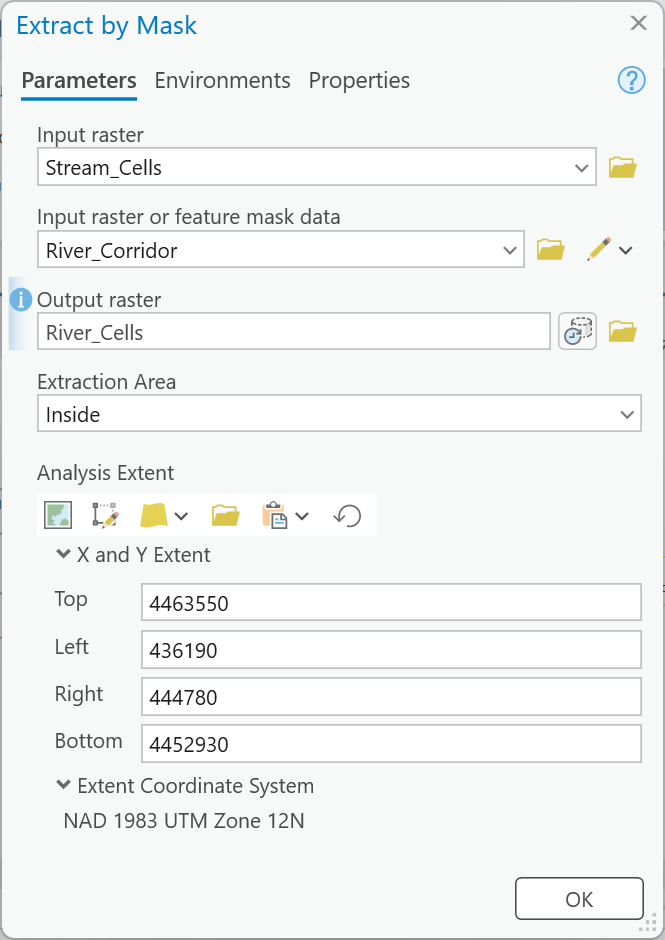
Figure 3b. Extract by Mask. With the Extent environment set, Analysis Extent fills in with the DEM's edges, not the corridor's.
Tip
Check the result: Flow_Accumulation reaches 1,050,227 cells. Stream_Cells has
74,866 cells; River_Cells 3,191.
Warning
Do not skip the corridor. Every one of the 74,866 stream cells — street gutters, ditches, canals — would become "a river" for Step 4, and the 100-year flood would cover 47.9 km² instead of 1.57. The threshold alone cannot tell the Provo River from a gutter: inside this box, the river carries water from 673 square miles upstream that the DEM never sees.
Step 4 — Height Above Drainage
Add Flow Distance (Spatial Analyst):
- Input stream raster:
River_Cells - Input surface raster:
Filled_DEM - Input flow direction raster:
Flow_Direction - Distance type: Vertical
- Input flow direction type: D8
- Statistics type: Minimum
- Output raster:
HAND
Make HAND a parameter. Save the model and run it inside ModelBuilder. When ArcGIS Pro asks whether
to build pyramids for HAND, click Yes.
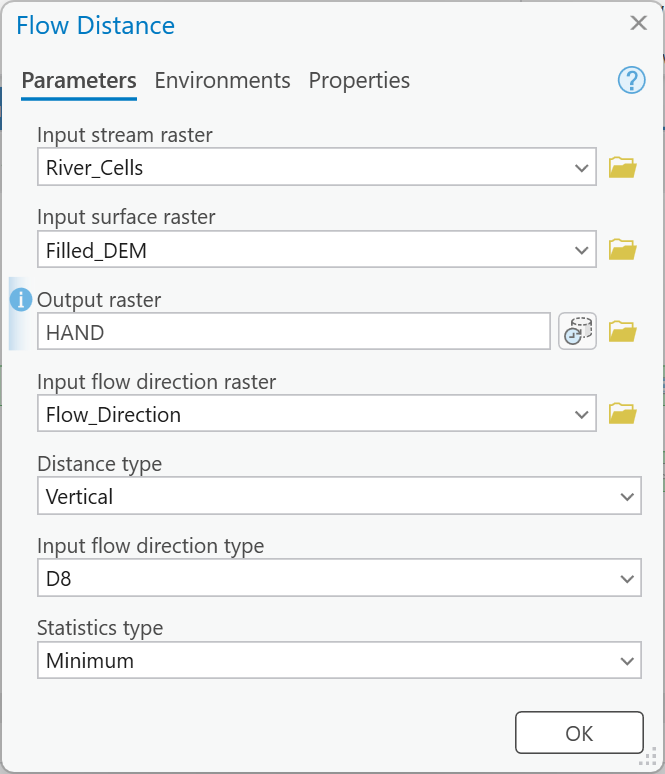
Figure 4. Flow Distance. Vertical, D8 and Minimum are the defaults; the flow
direction raster is not, so choose Flow_Direction.
Tip
Check the result: HAND has values on 697,608 cells, from 0 to 197.95 m (mean
23.54). The rest is NoData: those cells drain somewhere other than the Provo River — to Utah
Lake, to a canal, or out of the box.
Warning
Use the filled surface. With Provo_DEM.tif as the surface instead of Filled_DEM, HAND has
6,141 negative cells (down to −1.92 m): the flow path climbs out of a pit the raw surface
still has. Flow Distance also runs without a flow direction raster (it derives its own D8); give it
yours anyway, so that the model says what it does.
Step 5 — Flood Every Return Period
A second model, so that the loop does not rerun Steps 2–4 five times.
- In the Catalog pane, right-click
Lab07.atbx▸ New ▸ Model. In Properties set NameFloodLoopand LabelFlood Loop. Set the same environments as in Step 0. -
On the ModelBuilder tab, in the Insert group, click Iterators ▸ Iterate Field Values. Double-click it: Input Table
Stage_Table(the downloaded one), FieldH_CM. Leave Data Type at String. Its green output isValue, the threshold in centimeters for one row at a time.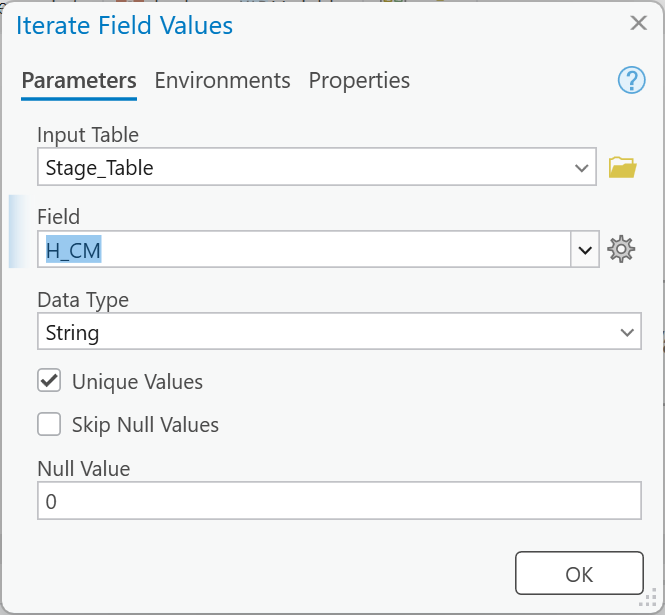
Figure 5a. Iterate Field Values: one pass per
H_CMin the stage table. -
Add
HANDto the map from your project geodatabase. Raster Calculator: double-clickHANDin the Rasters list (it goes in as"HAND"), then type the rest:Con("HAND" <= %Value% / 100, 1). Outputflood_%Value%. ModelBuilder adds aHANDoval; right-click it ▸ Parameter.%Value%is replaced by each row's number before the expression runs, so the first pass computesCon("HAND" <= 119 / 100, 1)and writesflood_119; when you run the model as a tool on a different HAND (Step 7), the expression follows the parameter.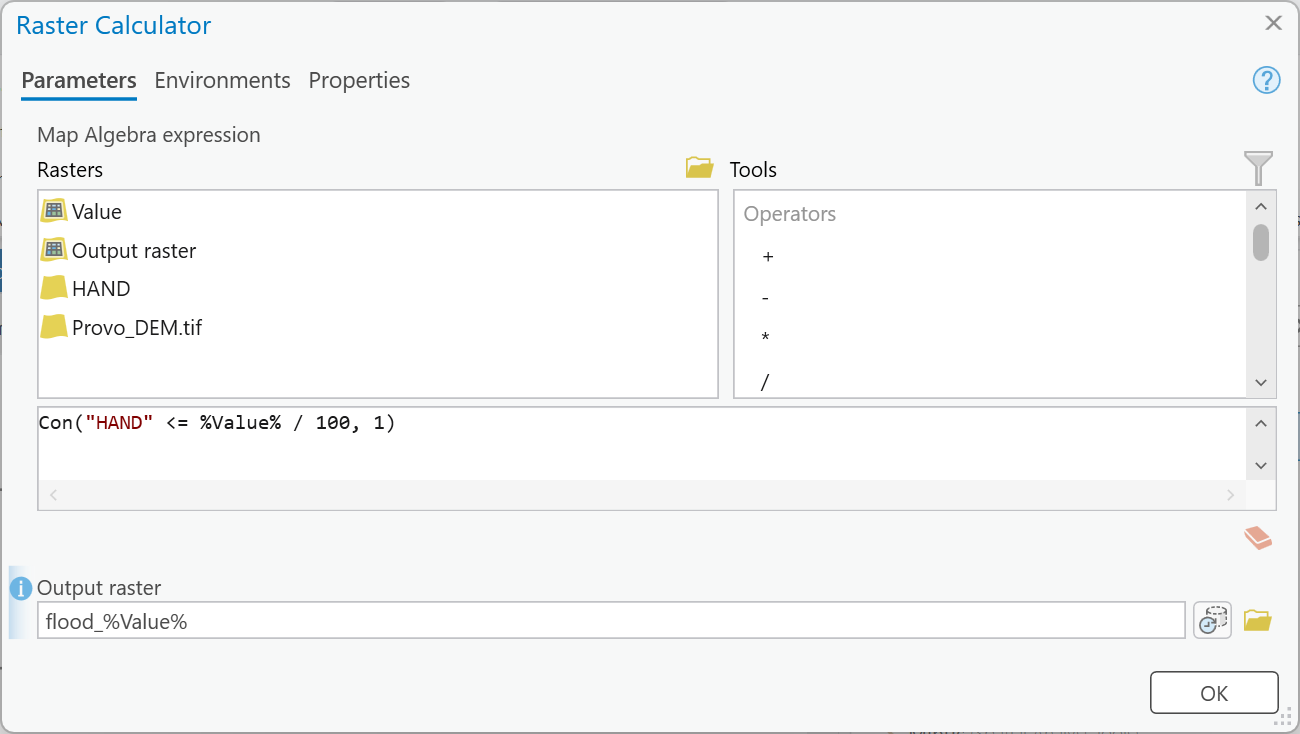
Figure 5b. One flood per pass. Type the output name last.
-
Raster to Polygon: input
flood_%Value%, Simplify polygons unchecked, Create multipart features checked, outputfloodpoly_%Value%. Each flood becomes one row.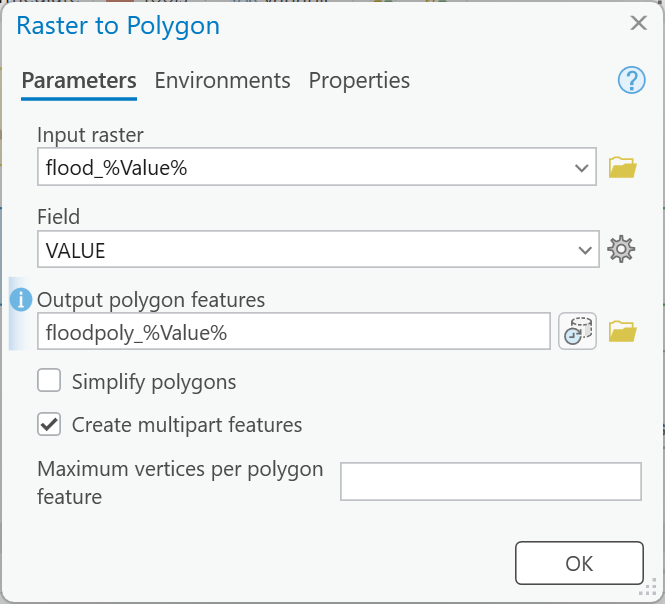
Figure 5c. Raster to Polygon, unsimplified and multipart.
-
Calculate Field: input
floodpoly_%Value%, Field NameH_CM(a new field), Field Type Long (32-bit integer),H_CM =%Value%. Its output oval is labeledfloodpoly_String; that is only ModelBuilder's name for it. -
Collect Values (ModelBuilder tab ▸ Insert group ▸ Utilities ▸ Collect Values): Input Value
floodpoly_String. Add Merge and drag from Collect Values' Output Values onto Merge, choosing Input Datasets, as in Lab 6. OutputFloods; makeFloodsa parameter.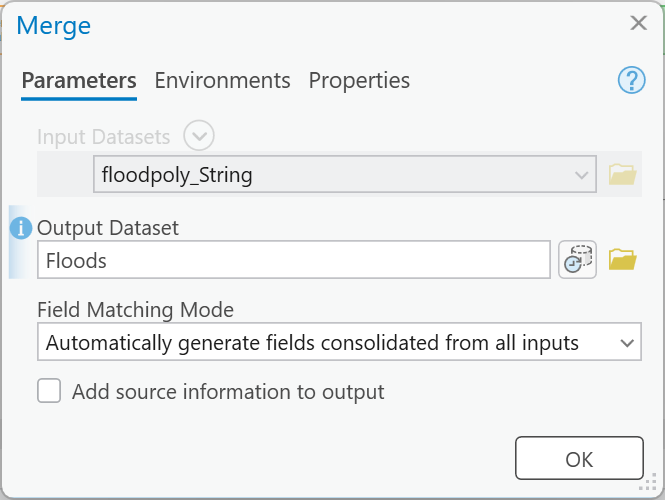
Figure 5d. Merge, fed by Collect Values, so it runs once, after the last pass.
-
Save, and run the model.
Tip
Check the result: Floods has 5 rows.
H_CM |
Wet cells | Area (km²) |
|---|---|---|
| 119 | 51,474 | 1.2869 |
| 134 | 56,420 | 1.4105 |
| 143 | 59,332 | 1.4833 |
| 153 | 62,693 | 1.5673 |
| 173 | 68,538 | 1.7135 |
Area is the wet cells × 25 m², exactly, because the polygons are not simplified. If you have only one row, Merge ran outside the loop; if you have many rows per value, Create multipart features was unchecked.
Note
Why centimeters? A name such as flood_1.53 is not allowed in a geodatabase, so the loop
iterates over whole centimeters and divides by 100 in the expression. Every threshold is rounded
to the centimeter; the stage table's H_M keeps the millimeters.
Step 6 — Count and Compare
Run these from the Geoprocessing pane, not in a model.
- Join Field: Input Table
Floods, Input FieldH_CM, Join TableStage_Table, Join FieldH_CM, Transfer Method Select transfer fields, Transfer FieldsRETURN_YRandQ_CFS. - Spatial Join: Target Features
Floods, Join FeaturesBuildings(leave Join Count Field Name atJoin_Count), Output Feature ClassFloods_Buildings, Join Operation Join one to one, Keep all target features checked, Match Option Intersect.Join_Countis the number of buildings each flood touches. - Compare the 100-year flood with FEMA. Select the
H_CM= 153 row ofFloodsand run Pairwise Clip withComparison_Area(outputHAND100_Compare), then Pairwise Intersect ofHAND100_CompareandFEMA_Floodplain_1pct(outputOverlap100). SumShape_Areain each of the three (right-click the field ▸ Statistics). Then: with O = area ofOverlap100, H = area ofHAND100_Compare(the clipped flood, not the whole one) and F = area ofFEMA_Floodplain_1pct:- hit rate = O ÷ F — the share of FEMA's floodplain HAND also floods;
- false-alarm ratio = (H − O) ÷ H — the share of HAND's flood FEMA does not map;
- critical success index, CSI = O ÷ (H + F − O) — 1 is perfect agreement.
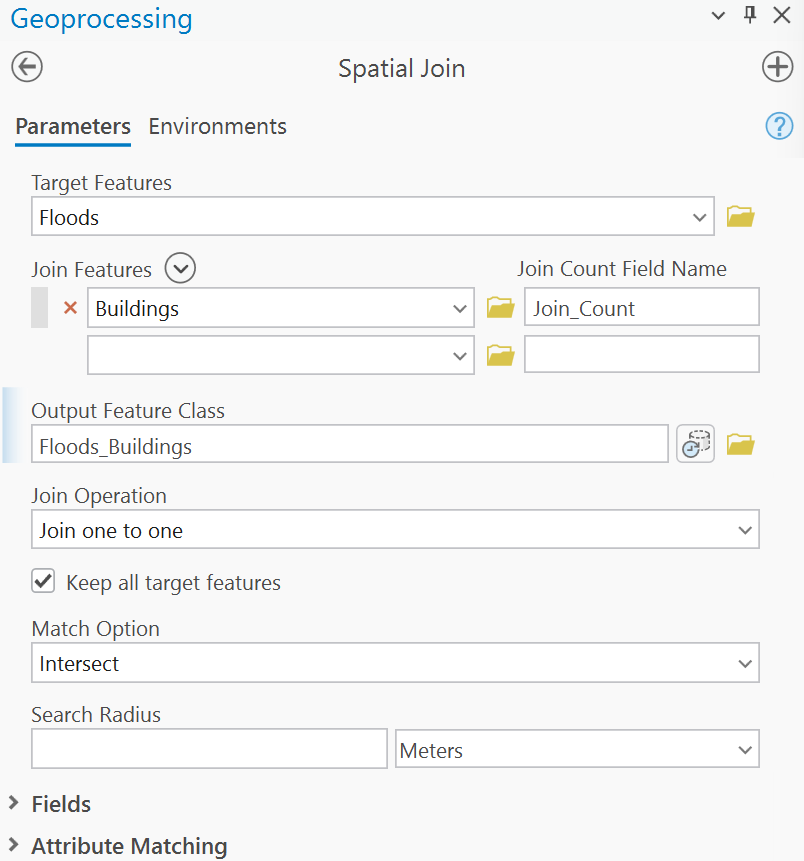
Figure 6a. Spatial Join: one row per flood, with the number of buildings it touches.
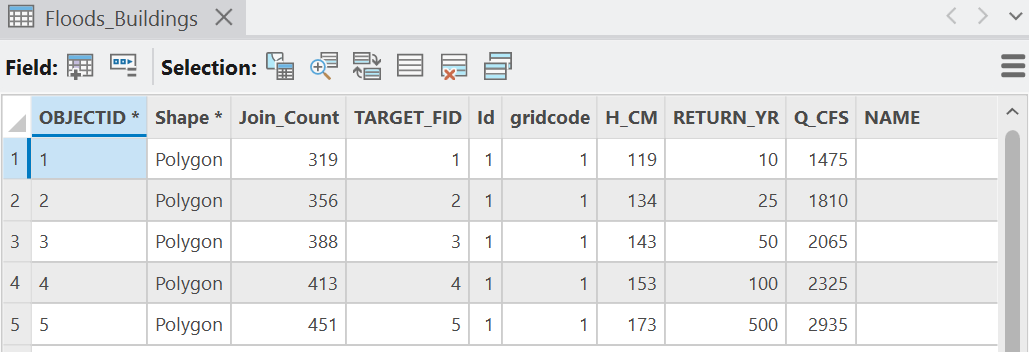
Figure 6b. Floods_Buildings. The columns after Q_CFS (NAME and the rest) come from one of
the buildings and mean nothing here.
Tip
Check the result:
RETURN_YR |
Q_CFS |
Area (km²) | Buildings (Join_Count) |
|---|---|---|---|
| 10 | 1,475 | 1.2869 | 319 |
| 25 | 1,810 | 1.4105 | 356 |
| 50 | 2,065 | 1.4833 | 388 |
| 100 | 2,325 | 1.5673 | 413 |
| 500 | 2,935 | 1.7135 | 451 |
At the 100-year flood: FEMA 1.3429 km², HAND in the comparison area 1.2801 km², overlap 0.7361 km² — hit rate 0.548, false-alarm ratio 0.425, CSI 0.390.
A CSI of 0.39 means the two maps agree on a bit more than a third of the land either one floods.
That is typical of HAND against a detailed study, and the disagreement is not spread evenly. Put
FEMA_Floodplain_1pct (symbolized by FLD_ZONE) over your 100-year flood and look along the whole
river. Your report names two places where HAND is wrong, with coordinates and a cropped figure
of each, and says why. Things to look for:
- A floodplain FEMA maps that leaves the river — HAND can only flood land that drains to the river.
- HAND flooding behind raised banks where FEMA keeps the water in the channel — HAND does not know a bank is there if water would drain around it.
- The channel itself: the lidar's river surface sits a median 0.47 m above FEMA's streambed
at FEMA's 42 cross-sections with a water surface, while h is measured from the gage's
zero-flow level, near the bed.
FEMA_Cross_Sectionsgives you the streambed and the 1% water surface to check this at the section nearest your place.
Note
Figure B (bottom) shows one place where they agree: at FEMA section C, just upstream of the gage, HAND floods 95 m of the 123 m section and FEMA's water surface covers 105 m.
Step 7 — Test the Threshold
First, your own design flood. Every student floods the river at a different flow, worked out
from your BYU ID number: the nine-digit number printed on your BYU ID card, such as
123456789. It is not your NetID, the user name of letters and numbers you chose and use to sign
in to BYU sites.
Your design flow Q = 900 + 12 × (the last two digits of your BYU ID) ft³/s
Then, exactly as in Step 1: the first row of
rating_10163000.csvwhose discharge is at least Q gives the gage height, and h = (gage height − 3.20) × 0.3048 m, to the millimeter.
- BYU ID
123456789: last two digits 89, Q = 900 + 12 × 89 = 1,968 ft³/s → 7.78 ft → h = 4.58 ft = 1.396 m.- BYU ID
987654302: last two digits 02, Q = 900 + 24 = 924 ft³/s → 6.24 ft → h = 3.04 ft = 0.927 m.Every design flow is between 900 and 2,088 ft³/s, inside the rating table. Write your BYU ID's last two digits, Q, the gage height and h in your report: the grader checks them.
From the Geoprocessing pane: Raster Calculator Con("HAND" <= 1.396, 1) (your h), output
flood_mine; Raster to Polygon as in Step 5; Spatial Join with Buildings as in Step 6.
Tip
Check the result: with the example h of 1.396 m, 58,193 wet cells, 1.4548 km² and 376 buildings; with 0.927 m, 1.0799 km² and 258 buildings.
Then, the threshold. Open HAND Builder from the Catalog pane (it opens as a tool) and
run it twice more, with Threshold 400 and 8000, and once at a threshold of your own
choosing. Give each run's HAND and River_Cells a new name (HAND_T400, River_Cells_T400).
Then run Flood Loop from the Catalog pane on each new HAND, with a new Floods name
(Floods_T400), and Spatial Join each one with Buildings.
Warning
A run from the tool dialog deletes everything that is not a parameter (Labs 5 and 8 saw it):
every intermediate — Filled_DEM, Flow_Direction, Flow_Accumulation, Stream_Cells,
River_Corridor — goes, and so do the loop's last flood_ and floodpoly_ (the earlier passes'
are left behind, overwritten by the new run). HAND, River_Cells and Floods are parameters,
so they stay, under the new names you typed.
Record all of it in one table: your baseline (threshold 2,000), the three threshold runs and
your design flood, with the threshold, the number of River_Cells, and the area and buildings of
the 10- and 100-year floods (for the design-flood row, its own area and buildings).
Tip
Check the result:
| Threshold (cells) | River_Cells |
10-yr km² | 10-yr buildings | 100-yr km² | 100-yr buildings |
|---|---|---|---|---|---|
| 400 | 3,513 | 1.5235 | 387 | 1.8591 | 497 |
| 2,000 (baseline) | 3,191 | 1.2869 | 319 | 1.5673 | 413 |
| 8,000 | 2,912 | 0.7684 | 169 | 0.9739 | 257 |
Then answer, in your report:
- What did the threshold change, and why? Compare
River_Cellsat 400 and 8,000 with the baseline on the map: which cells join "the river" and which drop out, and what does that do to the floods and the building counts? - Your flood against the threshold. Where does your design flow fall against FEMA's return periods — below the 10-year flow, or between two of them? Did changing your flow move the building count more or less than changing the threshold did?
- Which threshold would you defend? At the 100-year flood, how does the CSI against FEMA
change from 400 to 8,000? Run Step 6's comparison on
Floods_T400andFloods_T8000, with new output names (HAND100_Compare_T400,Overlap100_T400, and so on) so that your baseline's stay. Use those numbers, not the look of the map, to choose.
Tip
For question 3, the 100-year CSI is 0.377 at 400, 0.390 at 2,000 and 0.325 at 8,000.
At 8,000 the upper river is no longer a stream at all — find where River_Cells_T8000 begins.
Deliverables
Make two professional map layouts (letter size):
- Your baseline floods — the five floods (10- to 500-year), nested and symbolized so each return period is readable, with a legend; the buildings the 100-year flood reaches highlighted; FEMA's 1% floodplain as an outline; the river and the gage; an inset or close-up of one place where HAND and FEMA disagree; an imagery basemap; a title, neat line, north arrow and scale bar; and a text box with your name, the date, the map projection, and the sources and dates of the elevation, the flows and the FEMA map.
- Your design flood — your own flow from Step 7 (or, if it tells a stronger story, one threshold run), symbolized with a legend, with FEMA's 1% outline and the buildings it reaches highlighted and counted; an imagery basemap; a title, neat line, north arrow and scale bar; and a text box with your name, the date, the map projection, and the sources and dates. The title and text box say what changed from Map 1 and why you chose it.
Write a brief report (2–3 pages of text, plus your figures and maps) covering:
- a title block — assignment title, your name, the date and the course — and the name of your peer reviewer, with a sentence on what you changed because of them
- the requirements of the project and your approach to solving it
- a description of both models a reader could repeat from: each tool and its settings, every input, intermediate and output dataset with its type, and how the loop's value reaches the Raster Calculator expression
- one full-page figure of the two models, exported from ModelBuilder (Export ▸ Export To
Graphic), and one screen capture of each model's tool dialog; and upload your project's
toolbox (
Lab07.atbx, in your project folder) with the report — the grader opens it to read your models - the three metadata values — the gage datum, the date of the rating, and the effective date of FEMA's flood study — and what each means for your result
- the 25-year row you verified in Step 1, worked out step by step, and a few sentences on why two 100-year floods differ (FEMA's 2,325 ft³/s against 3,111 and 2,827 from the peaks)
- your check values from Steps 3 to 6: river cells, the HAND range, the five areas and building counts, and the 100-year hit rate, false-alarm ratio and CSI
- where HAND is wrong: two places, each with coordinates, a cropped figure and the reason — and what the 0.47 m between the lidar's river surface and FEMA's streambed does to every flood
- your sensitivity table from Step 7, with your BYU ID's last two digits, Q, gage height and h, and your answers to its three questions
- figures numbered and referred to in the text, and every source credited
- one line at the end saying what you used AI for, if anything (see the note under the rubric)
- a copy of the rubric below with your self-assessment filled in — a score in every row, honestly arrived at. The grader will compare it with theirs.
Note
Make it yours. Everyone works from the same data, so the numbers will match a classmate's; the choices should not. Your map layouts, your color ramps and symbology, the labels you give your models' elements, the places you pick in Step 6 and the wording of your report are your own work. Submissions whose layouts, labels or symbology match another student's too closely are flagged for follow-up.
Important
Peer review before you submit. Have another student in the class read your report against the rubric and give you feedback, then act on that feedback before the deadline. Name your reviewer in the report and say in a sentence what you changed because of them.
Credit line for your maps: Elevation: USGS 3D Elevation Program lidar (read October 2026, 5 m). Flows and floodplain: FEMA Flood Insurance Study and National Flood Hazard Layer, Utah County (effective June 23, 2026). Gage and rating: USGS 10163000. River and buildings: Utah Geospatial Resource Center.
References
Federal Emergency Management Agency (2026). Flood Insurance Study, Utah County, Utah, and Incorporated Areas, volume 49049CV001B, revised June 23, 2026. Table 9, Summary of Discharges. FEMA Flood Map Service Center.
Federal Emergency Management Agency. National Flood Hazard Layer (map service). hazards.fema.gov.
Nobre, A.D., Cuartas, L.A., Hodnett, M., Rennó, C.D., Rodrigues, G., Silveira, A., Waterloo, M., and Saleska, S. (2011). Height Above the Nearest Drainage — a hydrologically relevant new terrain model. Journal of Hydrology 404, 13–29. doi:10.1016/j.jhydrol.2011.03.051.
England, J.F., Jr., and others (2019). Guidelines for Determining Flood Flow Frequency — Bulletin 17C. U.S. Geological Survey Techniques and Methods, book 4, chapter B5. doi:10.3133/tm4B5.
U.S. Geological Survey. Monitoring location 10163000, Provo River at Provo, UT: annual peaks and rating 30.0. waterdata.usgs.gov.
U.S. Geological Survey, Water Science School. How Streamflow is Measured. usgs.gov.
U.S. Geological Survey, 3D Elevation Program. 3DEP Elevation image service. elevation.nationalmap.gov.
Utah Geospatial Resource Center. NHD Streams and Building Footprints. gis.utah.gov — NHD streams; gis.utah.gov — building footprints.
Esri. Flow Distance and Iterate Field Values, ArcGIS Pro tool reference (linked in the tools table above).
Example Maps
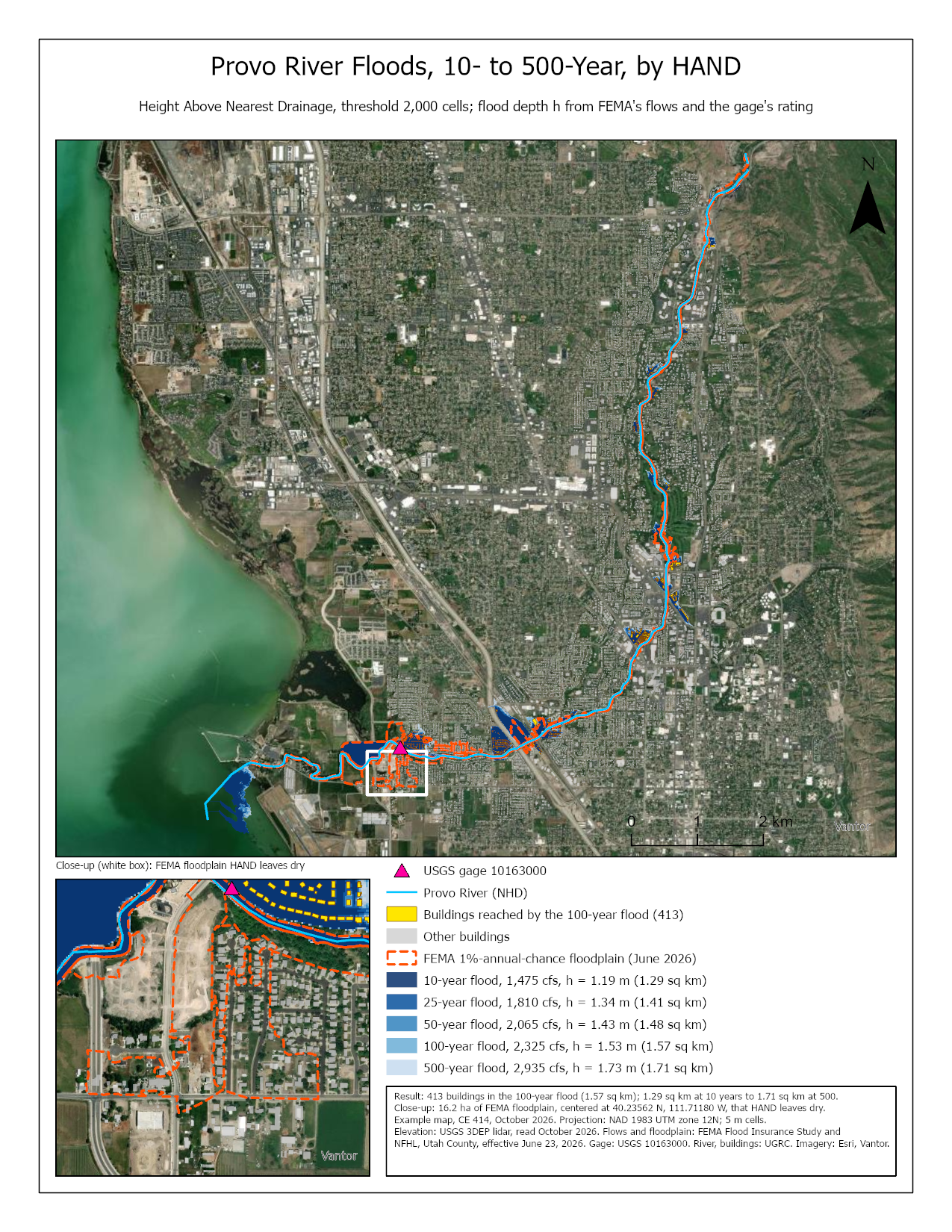
Figure 7. The baseline map. Do better than this example: at the scale of the whole study area, the floods are thin; label the return periods on the map, or add a second close-up, so a reader can see them nest.
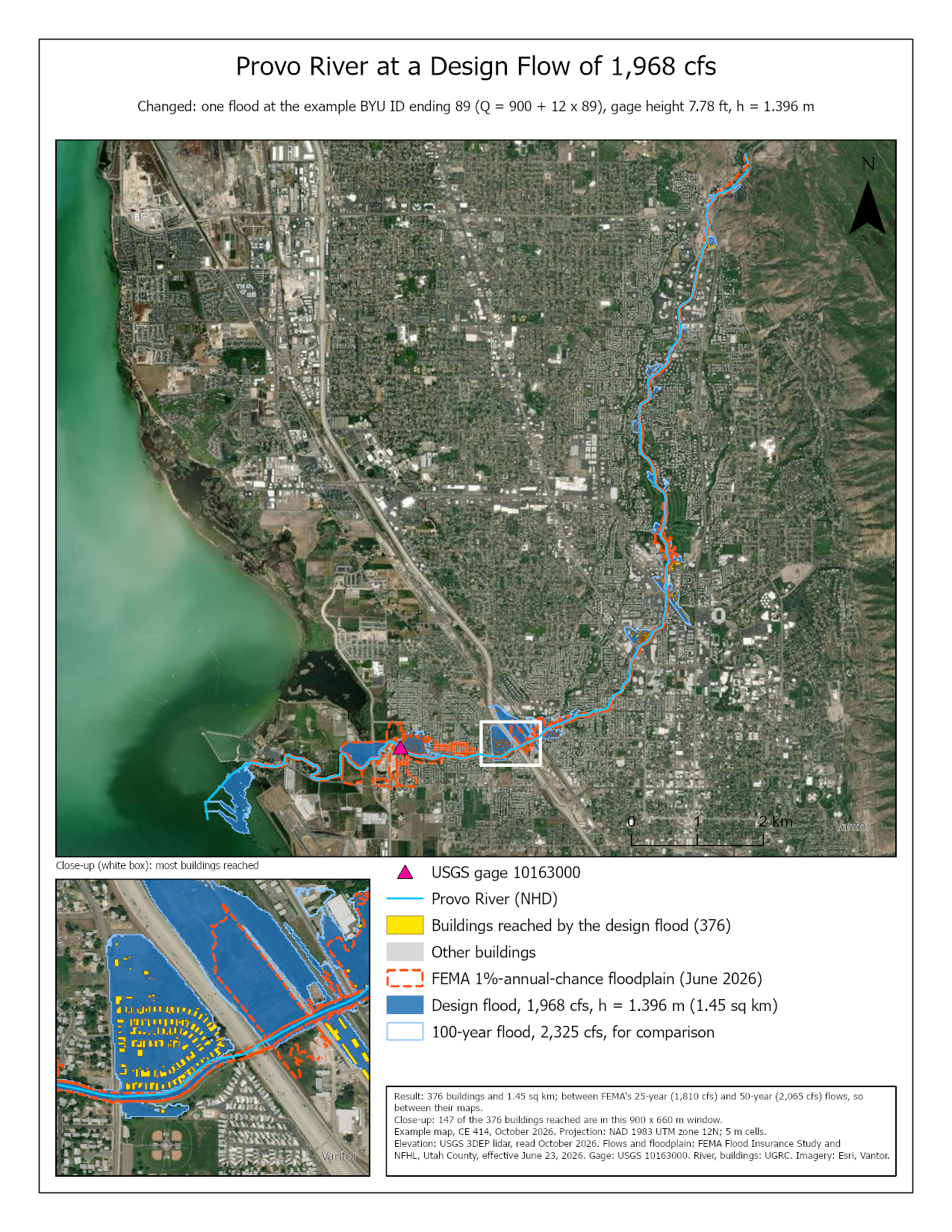
Figure 8. The design-flood map, for the example BYU ID ending 89. Your close-ups should be your own places, not these two.
Rubric for Flood Mapping with HAND
Fifty points in five parts of ten. The bullets say what each part is worth, so you know exactly what to submit.
| Item | Points |
|---|---|
| Write-up (2–3 pages) • Assignment title, your name, date and course; your peer reviewer named, with a sentence on what you changed because of them (1) • The requirements of the project and your approach to solving it, in your own words (1) • The three metadata values — gage datum, rating date, FEMA effective date — and what each means for your result (2) • The 25-year row verified step by step, and why two 100-year floods differ, with the numbers (2) • Your check values: the five flood areas and building counts, and the 100-year hit rate, false-alarm ratio and CSI (1) • Where HAND is wrong: two places, each with coordinates, a cropped figure and the reason, and what the 0.47 m channel offset does to every flood (2) • Organized writing, figures numbered and referred to, sources credited, rubric pasted with your self-assessment (1) |
/10 |
| ModelBuilder models — correct and working • Both models run from their tool dialogs and, at the defaults, match the check values: river cells, the HAND range, and the five flood areas (4) • A full-page figure of both models exported from ModelBuilder, all tools and datasets readable (2) • Screen captures of both tool dialogs with the threshold, HAND and the floods exposed as parameters (2) • A description of both models a reader could repeat from, including how the loop's value reaches the expression (2) |
/10 |
| Map 1 — your baseline floods • Title, neat line, north arrow and scale bar (1) • Text box with author, date, map projection, and the sources and dates of the elevation, flows and FEMA map (1) • The five floods nested and symbolized so each return period is readable, with a legend (2) • Buildings reached by the 100-year flood highlighted, and FEMA's 1% floodplain outlined (2) • An inset or close-up of one place where HAND and FEMA disagree (2) • Basemap, scale and legibility appropriate to the river (2) |
/10 |
| Map 2 — your design flood • Title, neat line, north arrow and scale bar (1) • Text box with author, date, map projection, and the sources and dates (1) • Your design flood (or a threshold run), with FEMA's 1% outline, symbolized with a legend (2) • The buildings it reaches highlighted, with their count (2) • Title and text box say what changed from Map 1 and why this run was chosen (2) • Basemap, scale and legibility (2) |
/10 |
| Sensitivity (Step 7) • One table with the baseline, the three threshold runs and your design flood — with your BYU ID's last two digits, Q, gage height and h — giving river cells, areas and building counts (4) • What the threshold changed and why, with your numbers (2) • Your flood against FEMA's return periods and against the threshold's effect (2) • The threshold you would defend, from the CSI (2) |
/10 |
| Total | /50 |
Note
Using AI on this lab. Use AI freely to understand a tool, work out an error, or tighten your write-up, and add one line at the end of your report saying what you used it for. Do not take a field name, an expression, a coordinate system, or a number from it — those come from your own data, and the rubric asks you to defend every one. See the AI Use Policy for the full policy.