Lab 9: Big Southern Butte
Civil Engineering 414 — Engineering Applications of GIS
Fall 2026 · Dr. Dan Ames
Measuring the volume of a volcanic dome by rebuilding the plain beneath it
Tip
Start from the report template. lab09-report-template.docx
has the title block, a section for every deliverable, the tables already set up with the columns the
rubric asks for, and the rubric at the end ready to fill in. You are welcome to write your report
any way you like — the template is a floor, not a ceiling — but if you use it and fill in every
section, you will not have left a graded item out.
Background
Big Southern Butte rises about 760 m (2,500 ft) out of the flat lava plain of the eastern Snake River Plain in Idaho, west of Idaho Falls. It is a rhyolite dome: two lobes of thick, silica-rich lava that pushed up through the plain's basalt and merged about 300,000 years ago, and it is among the largest rhyolite domes in the world (USGS Yellowstone Volcano Observatory, 2023). How much lava a dome holds is one of the numbers a volcanologist uses to compare eruptions, and nobody can weigh a mountain. They measure it from an elevation model.
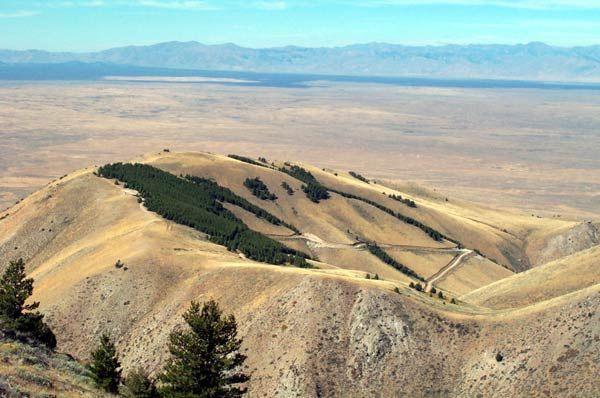
Figure B. Big Southern Butte from the plain. The plain looks flat; it falls gently to the north.
The trick is the ground under the butte. You cannot see it, so you rebuild it: sample elevations on the plain all around the butte, interpolate a surface across the gap, and subtract that surface from the real one. What is left is the butte, cell by cell, and adding up its cells gives its volume. That is the same idea as Lab 6, where the water surface was the lid and the lake bed the bottom; here the DEM is the lid and an interpolated plain is the bottom.
Every part of that recipe is a choice: where the butte ends, how many points sample the plain, and how you interpolate between them (the Week 9 methods). In Step 9 you vary each choice and see which moves the answer most.
Important
Your job — see the deliverables below. Build one ModelBuilder model that takes a DEM and an outline and returns the volume of the land inside the outline above an interpolated base surface; run it on Big Southern Butte; test how much the outline, the number of points, and the interpolation method change the volume; and make two maps.
Problem Statement
You are given a 10 m elevation model of Big Southern Butte and the plain around it, and a reference outline of the butte's base. Using them:
- Rebuild the plain beneath the butte by interpolating from random points on the plain around it.
- Compute the height of the butte above that rebuilt plain in every cell.
- Report the butte's volume in cubic kilometers.
- Map the height of the butte above the plain.
Analysis Considerations
Every one of these is a decision somebody made, and every one of them can change the answer.
- Where the butte ends. The base of a dome blends into its apron of debris and into the lava
flows around it. The reference outline was drawn by a rule from the DEM — every cell standing more
than 10 m above a plane fitted to the plain — and
READ-ME-FIRST.txtexplains it. It is a reasonable base, not the only one. In Step 9 you draw your own. - The points on the plain. Points inside the outline sample the butte, not the plain, so the model erases them. The rest sample a ring of plain 1,500 m wide. More points follow the plain's bumps more closely; fewer points smooth them out. The points are random, so two runs differ — unless you fix the random seed, which Step 0 does so that your numbers match this page.
- The interpolation method. IDW never goes above its highest point or below its lowest, so the rebuilt plain stays inside the range of the plain around it. A spline is smooth and can overshoot. Week 9 compared them; here you see what the difference does to a volume.
- What the volume is. The volume above an interpolated surface. If lava flows of the plain lap against the butte's lower slopes, part of the dome is buried below that surface, and no elevation model can see it.
- The elevation model. Bare earth, 1/3 arc-second cells (about 10 m), elevations in meters above NAVD 88.
- The coordinate system. A volume needs the cell size and the elevations in the same unit. The DEM arrives in latitude and longitude; Step 1 projects it to NAD 1983 UTM zone 12N in meters, so that each 10 m cell is 100 m² and each meter of height over it is 100 m³.
Data
Important
Set up your folder before you download anything. On the lab machines, work on the D:
drive: one folder for this class named after you, D:\Smith\, and one folder per lab inside
it, D:\Smith\Lab09\. The C: drive is locked, and a network drive is slow enough to make
ArcGIS Pro hang. Never use a space in a folder or file name you create — raster tools fail on
them without saying why. Back up your lab folder at the end of every session. The full set of
conventions is on the ArcGIS Tips and Reminders page.
| Layer | Where it comes from | How you get it |
|---|---|---|
BigSouthernButte_DEM.tif |
USGS 3D Elevation Program, 1/3 arc-second DEM, two tiles joined | Prepared extract, hosted here |
Lab09.gdb\Butte_Boundary |
Derived from the DEM for this course (see the READ-ME) | In the same zip |
- Download:
lab09-big-southern-butte.zip(10.4 MB). Unzip it into your Lab09 folder — the files are in alab09-big-southern-buttefolder inside it — and readREAD-ME-FIRST.txt.
Tip
Check the data: BigSouthernButte_DEM.tif is 3,024 columns × 1,836 rows of 1/3
arc-second cells, values 1,499.8 to 2,307.1 (meters above NAVD 88), GCS North American 1983,
no NoData cells. Butte_Boundary is one polygon of 28.03 km² in NAD 1983 UTM Zone 12N.
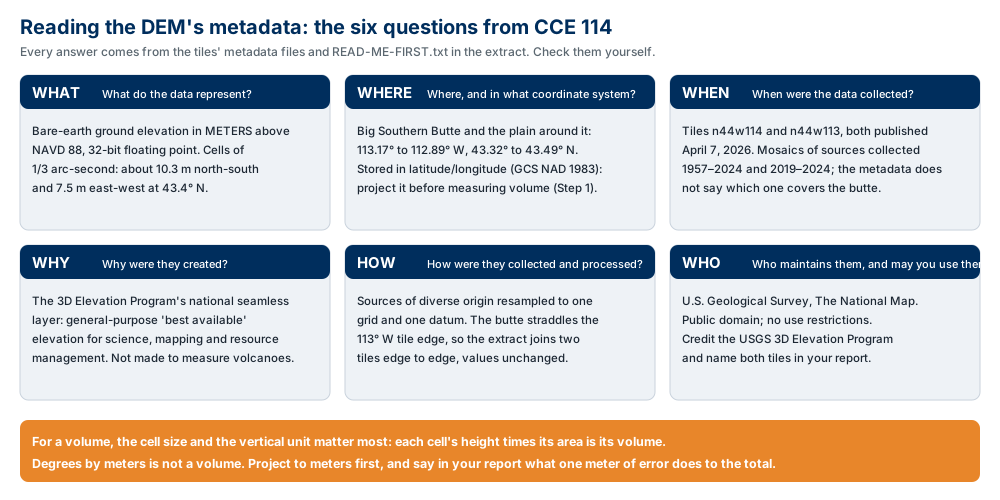
Figure A. The six metadata questions, applied to the DEM. Confirm three of the values yourself —
in READ-ME-FIRST.txt, in the raster's properties in ArcGIS Pro, and in the tiles'
metadata files
(n44w114,
n44w113)
— and say in your report what each one does to your result.
ModelBuilder Tools
New in this lab:
| Tool | What it does |
|---|---|
 Create Random Points (Data Management) |
Scatters a given number of points at random inside a polygon. The points have a location and nothing else. Tool reference |
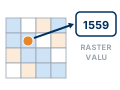 Extract Values to Points (Spatial Analyst) |
Copies the raster value under each point into a new field, RASTERVALU. Tool reference |
 Erase (Analysis) |
Removes the parts of one layer that fall inside another — here, the points on the butte. Tool reference |
 Zonal Statistics (Spatial Analyst) |
A statistic of a raster's cells inside each zone — here, the sum of the cell volumes inside the outline. Tool reference |
Tools you already know: IDW (Lab 8), Project Raster (Labs 4 and 5), Buffer (Labs 1 and 4), Extract by Mask (Lab 4), Raster Calculator (Labs 2, 4–6 and 8), Hillshade, and model parameters. Step 9 also uses Spline (Spatial Analyst), the smooth interpolator from the Week 9 lectures.
Example Model
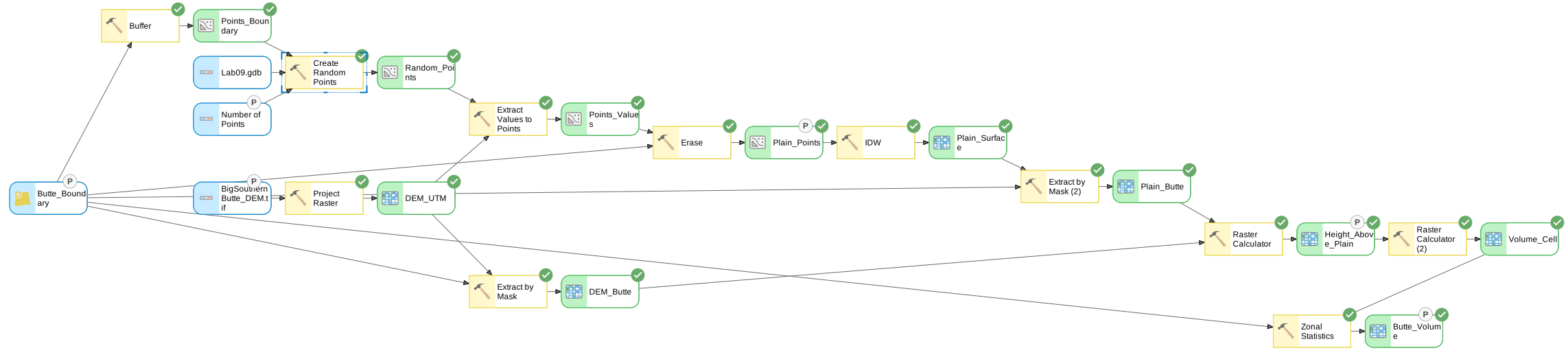
Figure C. The finished model, exported from ModelBuilder — click it to open it full size. Two
inputs, the DEM and the outline, and one number out. The upper branch rebuilds the plain from points
around the butte; the lower branch cuts the real surface to the outline; two Raster Calculators and
Zonal Statistics turn the difference into a volume. The six elements marked P are the model
parameters and become the tool dialog of Step 9.
Complete the Lab
For an advanced GIS student, the information up to this point is all you need to complete the assignment. Feel free to try the analysis using only the information above. If you complete the lab without the step-by-step instructions below, say so in your report.
Step-by-Step Solution
Note
Every check value on this page was measured on the files you download, with the steps below, in ArcGIS Pro 3.7.1. With the random seed of Step 0, your numbers should match to the last digit shown.
Step 0 — Set Up the Project
- Create a new project in
D:\Smith\Lab09\with the Map template; if you already made the folder, uncheck Create a folder for this local project. - Add
BigSouthernButte_DEM.tif(click OK to build pyramids and statistics) andLab09.gdb\Butte_Boundary. Add an imagery basemap and look at the outline against it. - Confirm Spatial Analyst is licensed (Project ▸ Licensing).
- On the Analysis tab click ModelBuilder. On the ModelBuilder tab click
Properties, set Name to
ButteVolumeand Label toButte Volume, and save. -
On the ModelBuilder tab click Environments and set:
- Current Workspace and Scratch Workspace: your project geodatabase
- Random Number Generator: Seed
1; leave Generator at ACM collected algorithm 599 - after Step 1 has run once: Cell Size
10, and Snap RasterDEM_UTM— it is not in the list until it is on a map, so browse to it in your project geodatabase or type its path
Type an environment's name in the dialog's search box to find it.
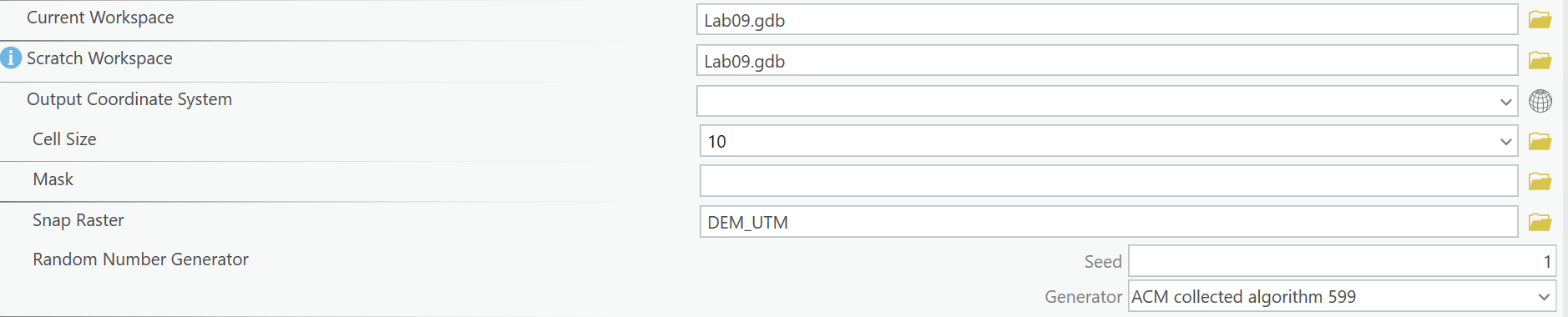
Figure 0. ModelBuilder ▸ Environments: the rows that matter, gathered from the top of the dialog and from searches for cell size and random. Leave
Output Coordinate System empty: Step 1 projects the DEM itself.
Note
Why fix the seed? Create Random Points draws from a random number generator. With the same seed it draws the same points every time, so your volume can be checked against this page. Another seed gives other points and a slightly different volume; Step 9 tests the choices that matter more.
Step 1 — Project the DEM
Add Project Raster with BigSouthernButte_DEM.tif as the input:
- Output Coordinate System: NAD 1983 UTM Zone 12N
- Resampling Technique: Bilinear interpolation
- Output Cell Size: 10 (X and Y)
- Output Raster Dataset:
DEM_UTM
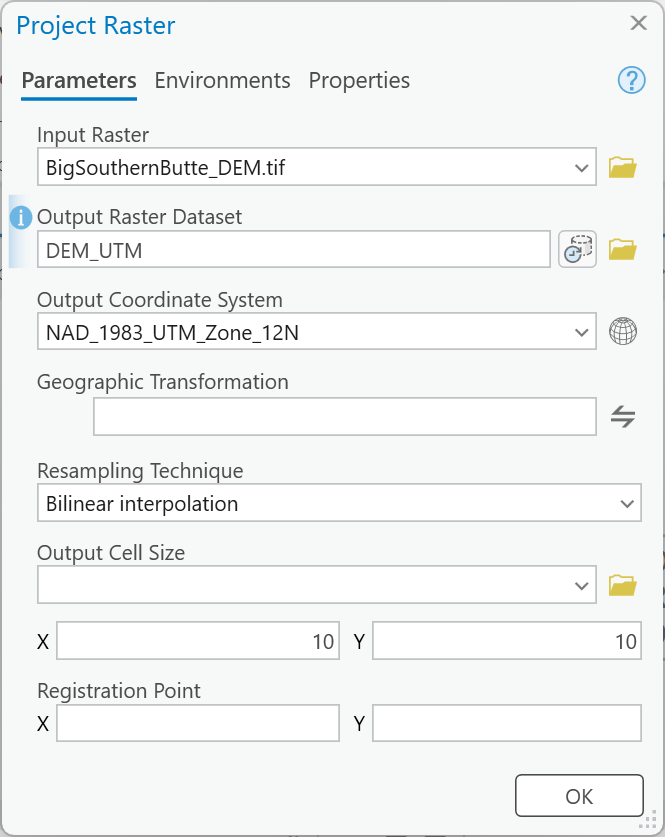
Figure 1. Project Raster. It switches itself to Bilinear when you pick this DEM and proposes cells of about 9.0 m; type 10 in both X and Y.
Tip
Check the result: DEM_UTM is 2,314 columns × 1,944 rows of 10 m cells, values
1,499.8 to 2,306.8 m. The summit cell is about 0.3 m lower than in the original because
bilinear resampling averages neighbors. The thin wedges along the edges are NoData: a latitude and
longitude rectangle is slightly tilted in UTM.
Step 2 — Draw the Sampling Ring
Add Buffer with Butte_Boundary as the input, Distance 1500 Meters, Dissolve Type
Dissolve all output features into a single feature, output Points_Boundary.
This polygon covers the butte and a ring of plain 1,500 m wide around it. The random points go here.
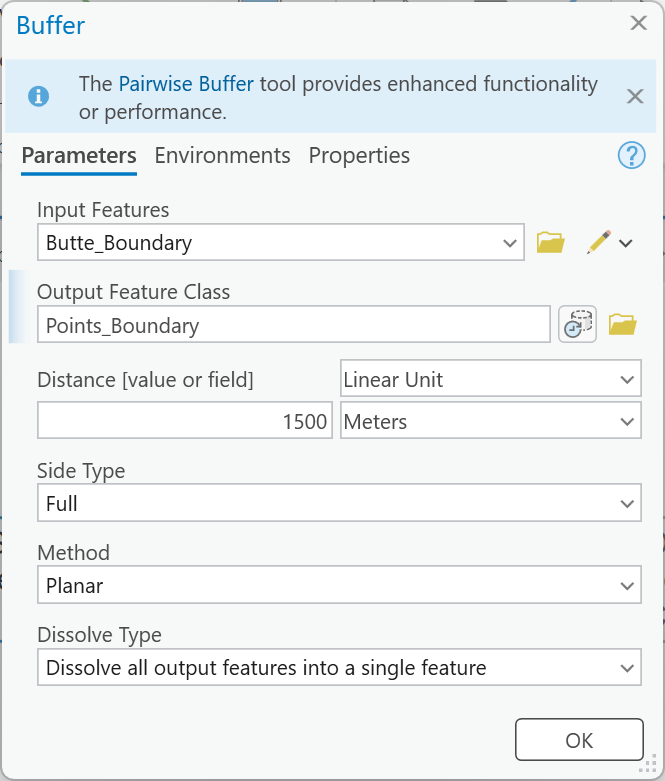
Figure 2. Buffer. Pairwise Buffer does the same job; either is fine.
Tip
Check the result: Points_Boundary is 65.411 km²; Butte_Boundary is 28.030 km² of
it.
Step 3 — Sample the Plain
- Add Create Random Points: Output Location your project geodatabase, Output Point
Feature Class
Random_Points, Constraining Feature ClassPoints_Boundary, Number of Points [value or field]1000(leave its type at Long). Then right-click the tool in the model ▸ Create Variable ▸ From Parameter ▸ Number of Points [value or field], right-click the new oval ▸ Rename itNumber of Points, and right-click it ▸ Parameter. - Add Extract Values to Points with
Random_PointsandDEM_UTM, outputPoints_Values.
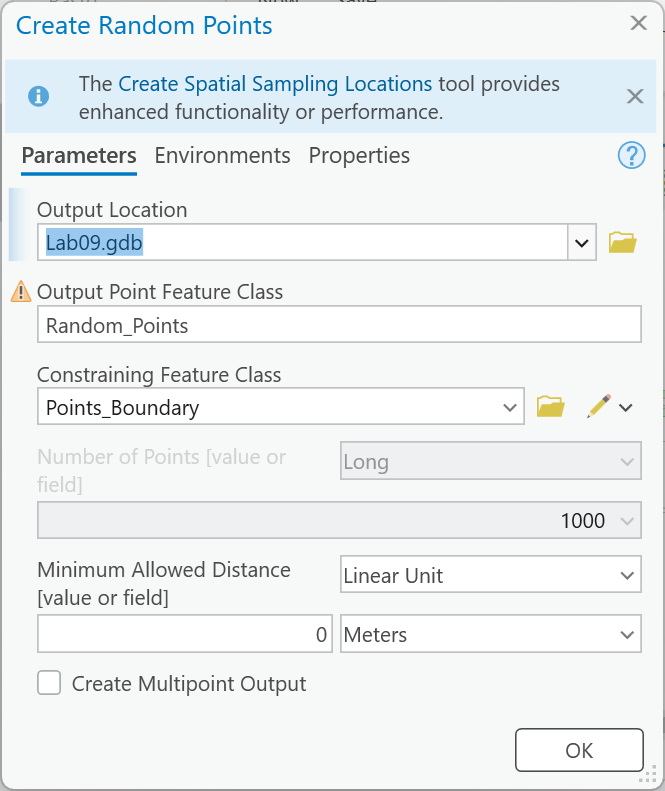
Figure 3a. Create Random Points. Once a constraining feature class is set, the Constraining Extent box disappears.
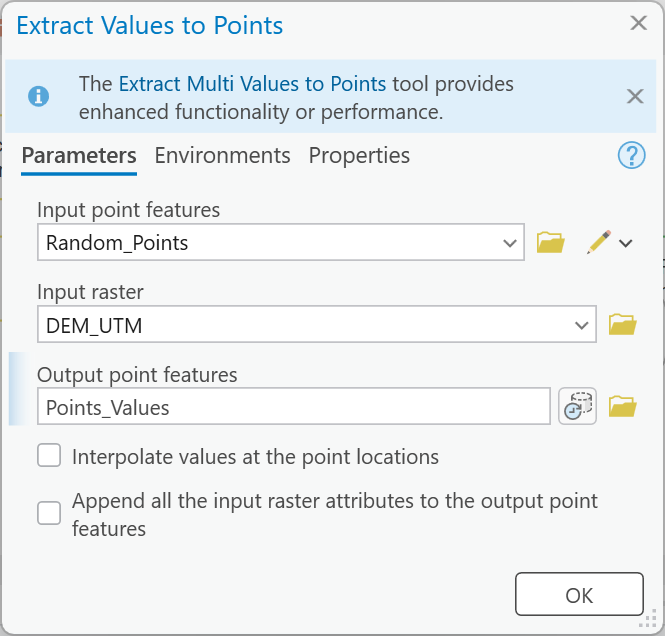
Figure 3b. Extract Values to Points.
Tip
Check the result: 1,000 points, RASTERVALU from 1,531.2 to 2,277.2 m. With seed 1, the
first point (OBJECTID 1) is at about 337,632.6 E, 4,806,349.7 N — on the butte's east-southeast
flank.
Step 4 — Keep the Plain Points
Add Erase: Input Features Points_Values, Erase Features Butte_Boundary, output
Plain_Points.
Warning
Pick the outline from Model Variables. The Erase Features list shows Butte_Boundary twice:
the map layer at the top, and the model's own variable under Model Variables, where it reads
Butte_Boundary:1. Choose the second. In our build, choosing the map layer added a second
Butte_Boundary oval to the model; the tool dialog would then ask for the outline twice and a
Step 9 run with your own outline would use both. The same goes for the masks in Steps 6 and 8.
If an extra oval appears, delete it and reconnect.
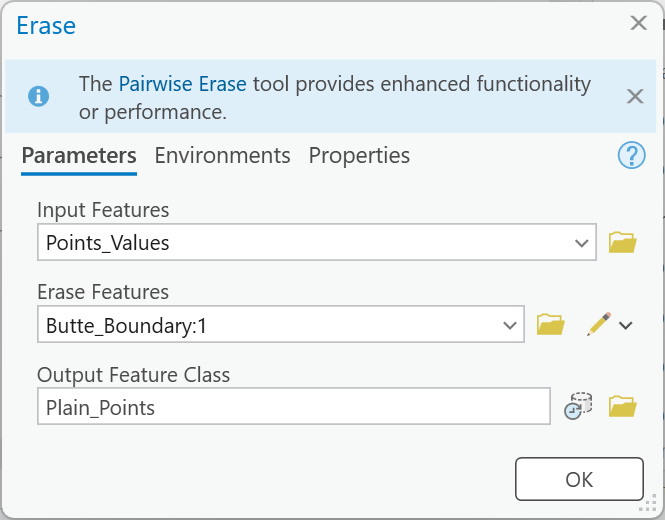
Figure 4. Erase, with the outline chosen from Model Variables.
Tip
Check the result: 560 points remain, RASTERVALU 1,531.2 to 1,597.0 m (mean
1,559.4). If any point is above 1,600 m, the erase used the wrong polygon.
Step 5 — Rebuild the Plain
Add IDW: Input point features Plain_Points, Z value field RASTERVALU, Output
cell size 10, Power 2, Search radius Variable with 12 points, output Plain_Surface.
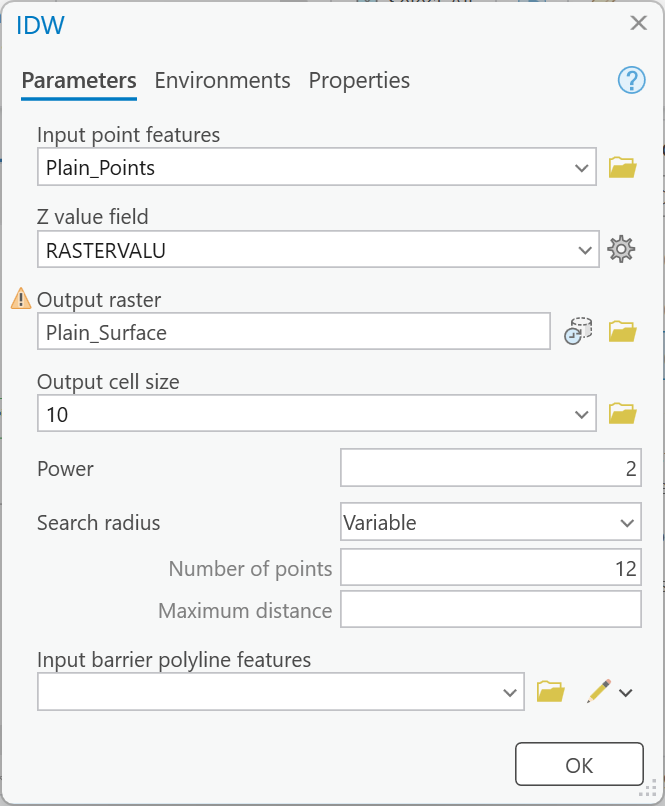
Figure 5. IDW. The warning icon only says Plain_Surface already exists from an earlier run.
Warning
Check the cell size. With the Cell Size environment of Step 0, IDW fills in 10. Without it,
IDW picks a cell size from the extent of the points, much coarser than the DEM's. Keep the Snap
Raster environment on DEM_UTM so the plain's cells line up with the DEM's. The Z value field list
stays empty until the model has run once; type RASTERVALU.
Tip
Check the result (after Step 6): inside the outline the rebuilt plain runs from 1,547.1 to 1,585.9 m, higher in the south. IDW cannot go above or below its points: compare with Step 4.
Step 6 — Cut Both Surfaces to the Outline
Add Extract by Mask twice, each with Butte_Boundary as the mask:
DEM_UTM→DEM_ButtePlain_Surface→Plain_Butte
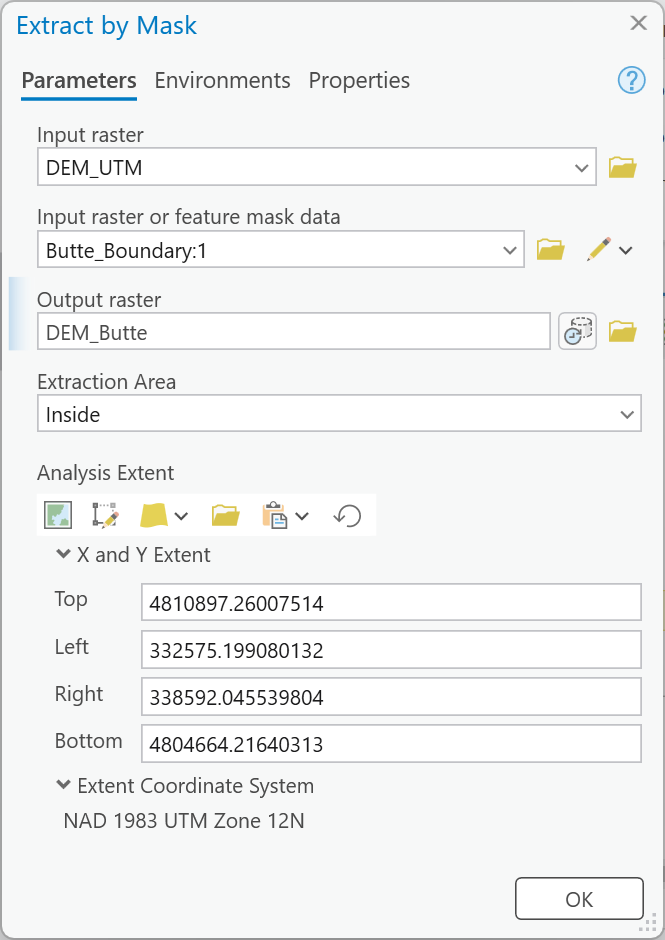
Figure 6. The first Extract by Mask. The Analysis Extent fills itself in from the mask; leave it. Type the output name last: this tool replaces a typed name when its inputs change.
Tip
Check the result: each is 280,311 cells — 28.03 km² of 10 m cells, the outline's area.
DEM_Butte runs from 1,554.8 to 2,306.8 m.
Step 7 — Compute Height and Volume
Add Raster Calculator twice, both in the model:
-
The height of the butte above the plain, in meters, output
Height_Above_Plain:"%DEM_Butte%" - "%Plain_Butte%" -
Each cell's volume, output
Volume_Cell:"%Height_Above_Plain%" * 10 * 10 / (1000 ** 3)Height times the cell's 10 m × 10 m is cubic meters; divided by 1,000³ it is cubic kilometers.
**is Python's power operator.
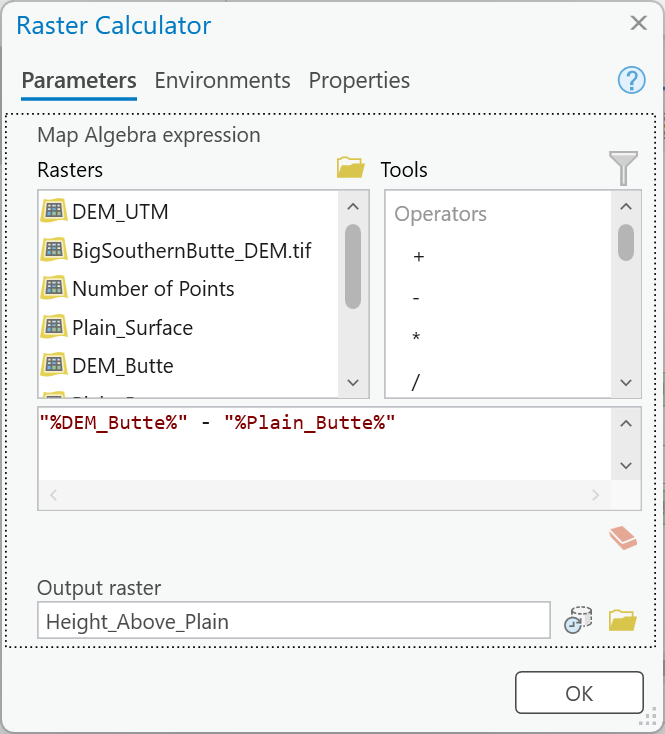
Figure 7a. The height above the plain.
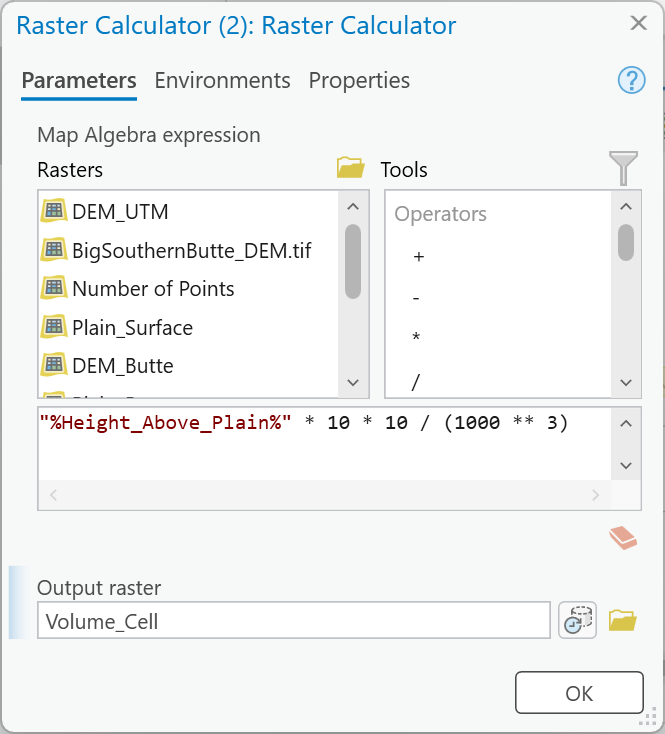
Figure 7b. Each cell's volume, in cubic kilometers. Raster Calculator replaced the typed output
name with RasterC_1 when the expression went in; type the name last and check it before OK.
Tip
Check the result: in Height_Above_Plain (Properties ▸ Source ▸ Statistics) the
tallest cell is 729.1 m above the plain and the mean is 183.5 m. 53 cells at the edge
are a fraction of a meter below the plain; they subtract a negligible amount.
Step 8 — Add Up the Volume
Add Zonal Statistics: Input raster or feature zone data Butte_Boundary, Zone field
OBJECTID, Input value raster Volume_Cell, Statistics type Sum, output Butte_Volume.
Every cell of the output holds the same number: the sum. Read it in the layer's Properties ▸
Source ▸ Statistics or by clicking a cell.
Make these model parameters, and name them so the tool dialog reads well: the DEM, Butte_Boundary
and the number of points (inputs), and Plain_Points, Height_Above_Plain and Butte_Volume
(outputs). Step 9 and your maps need all three outputs.
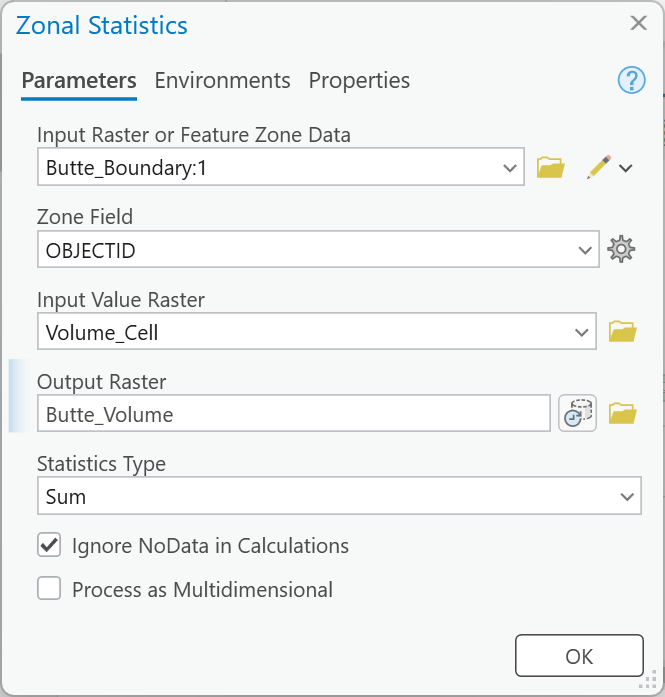
Figure 8a. Zonal Statistics. Zone Field fills in OBJECTID by itself; Statistics Type opens at
Mean — change it to Sum, near the bottom of the list.
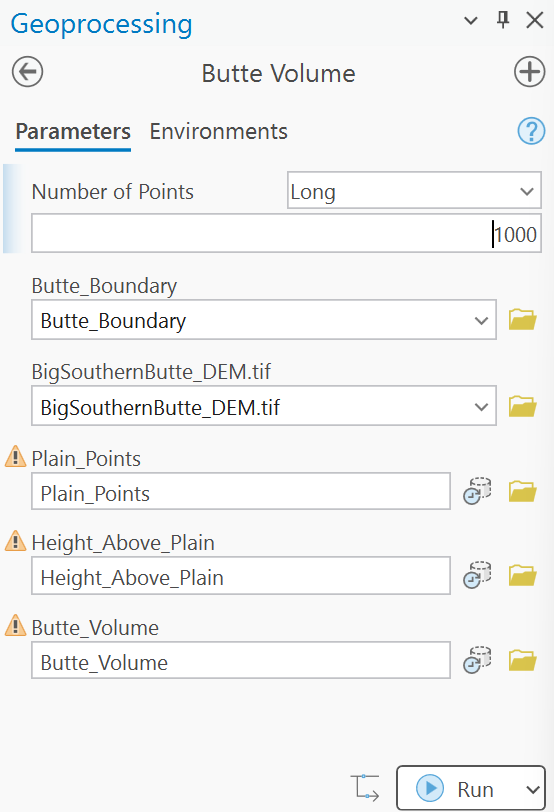
Figure 8b. The model as a tool. The warning icons only say the outputs exist from an earlier run; give every output a new name for each Step 9 run.
Tip
Check the result: 5.145 km³. As a sanity check: 28.03 km² of outline times a mean height of 183.5 m is 5.14 km³.
Warning
A run from the tool dialog deletes everything that is not a parameter (Labs 5 and 8 saw it),
including DEM_UTM. Do Steps 1–8 from inside ModelBuilder first and record the check values before
any dialog run. In our build, a dialog run at 250 points took 1 minute 10 seconds and left only its
three outputs and Random_Points. The model makes DEM_UTM again at the start of every run, so
the Snap Raster setting still works.
Step 9 — Test the Assumptions
The volume rests on three choices: the outline, the number of points, and the interpolation method.
Run the model from its tool dialog four more times, giving each output a name that says what
changed (Butte_Volume_n250, Height_Above_Plain_n250):
- Fewer and more points: 250 and 4,000 (two runs).
- Your own outline: in your project geodatabase, create a polygon feature class
My_Butte_Boundaryin NAD 1983 UTM Zone 12N. Turn off the reference outline layer, make a hillshade ofDEM_UTMwith the Hillshade tool, and digitize the base of the butte against it and the imagery as one polygon — Zonal Statistics sums each feature separately, so a second feature gives a second volume. Run the tool with it at 1,000 points. - Another method: save a copy of the model (Save As), replace IDW with Spline (Regularized, weight 0.1, 12 points, cell size 10), and run it once at 1,000 points with the reference outline. Leave the Processing Extent environment at its default: the spline's result depends on it.
For the baseline and every run, in one table, record what changed, the points kept after the erase, the outline's area, the volume, the tallest cell, and the number of cells below the plain. Where to read each:
- Points kept: the record count of that run's
Plain_Points(open its attribute table). - Outline area: the outline's
Shape_Areafield, in square meters. - Tallest cell: that run's
Height_Above_Plain, Properties ▸ Source ▸ Statistics, maximum. - Cells below the plain: Raster Calculator,
Con("Height_Above_Plain_n250" < 0, 1)(use the run's own raster), then the Count of value 1 in the output's attribute table. No output, or an empty table, means zero.
Then answer, in your report:
- Which choice moves the volume most, and which least? Rank them with your numbers.
- What did the spline do that IDW cannot? Map its cells below the plain and explain them with what you learned about the methods in Week 9 and Lab 8.
- What does your number measure? Is it the volume of the lava dome? Say what part of the dome the model cannot see, and what data would let you measure it.
Tip
The random part of the model is not the part that matters most. Check how far apart your 250- and 4,000-point runs are before you guess.
Deliverables
Make two professional map layouts:
- Your baseline result —
Height_Above_Plainfrom the baseline run in a clear color scale with a legend in meters, over a hillshade or imagery, with the reference outline, the volume in the title or a text box, a neat line, north arrow and scale bar, a text box with your name, the date, the map projection and the DEM's source and date, and an inset locating the butte in Idaho. - One scenario from Step 9 — your own outline or the spline, whichever changes the picture more, with the same color scale as Map 1 so the two can be compared. Say on the map what changed and by how much.
Write a brief report (2–3 pages of text, plus your figures and maps) covering:
- a title block — assignment title, your name, the date and the course — and the name of your peer reviewer
- the requirements of the project and your approach to solving it
- a description of your model a reader could repeat from: each tool and its settings, and every input, intermediate and output dataset with its type
- one full-page figure of your model, exported from ModelBuilder (Export ▸ Export To Graphic), and one screen capture of its tool dialog with the outline and the number of points exposed
- the three metadata values for the DEM — its publication date and source dates, its vertical datum and units, and its cell size — and what each one means for your result
- your check values from Steps 4 to 8: the points kept, the tallest cell, and the volume
- your sensitivity table from Step 9 and your answers to its three questions
- a copy of the rubric below with your self-assessment filled in — a score in every row, honestly arrived at. The grader will compare it with theirs.
Important
Peer review before you submit. Have another student in the class read your report against the rubric and give you feedback, then act on that feedback before the deadline. Name your reviewer in the report and say in a sentence what you changed because of them.
Credit line for your maps: Elevation: USGS 3D Elevation Program, 1/3 arc-second DEM, tiles n44w114 and n44w113 (April 2026). Butte outline: derived from the DEM for CE 414.
References
Greeley, R. (1982). The Snake River Plain, Idaho: Representative of a new category of volcanism. Journal of Geophysical Research, 87(B4), 2705–2712. doi:10.1029/JB087iB04p02705.
Hughes, S.S., Smith, R.P., Hackett, W.R., and Anderson, S.R. (1999). Mafic volcanism and environmental geology of the eastern Snake River Plain, Idaho. In Hughes, S.S., and Thackray, G.D., eds., Guidebook to the Geology of Eastern Idaho, Idaho Museum of Natural History, 143–168.
Lifton, Z. (2023). The Big Buttes of the Eastern Snake River Plain. Yellowstone Caldera Chronicles, USGS Yellowstone Volcano Observatory, December 4, 2023. usgs.gov.
U.S. Geological Survey, 3D Elevation Program. 1/3 arc-second DEM, tiles n44w114 and n44w113, published April 7, 2026.
Example Maps
These are examples, not templates. Your maps carry your name, and your second map shows the run you chose.
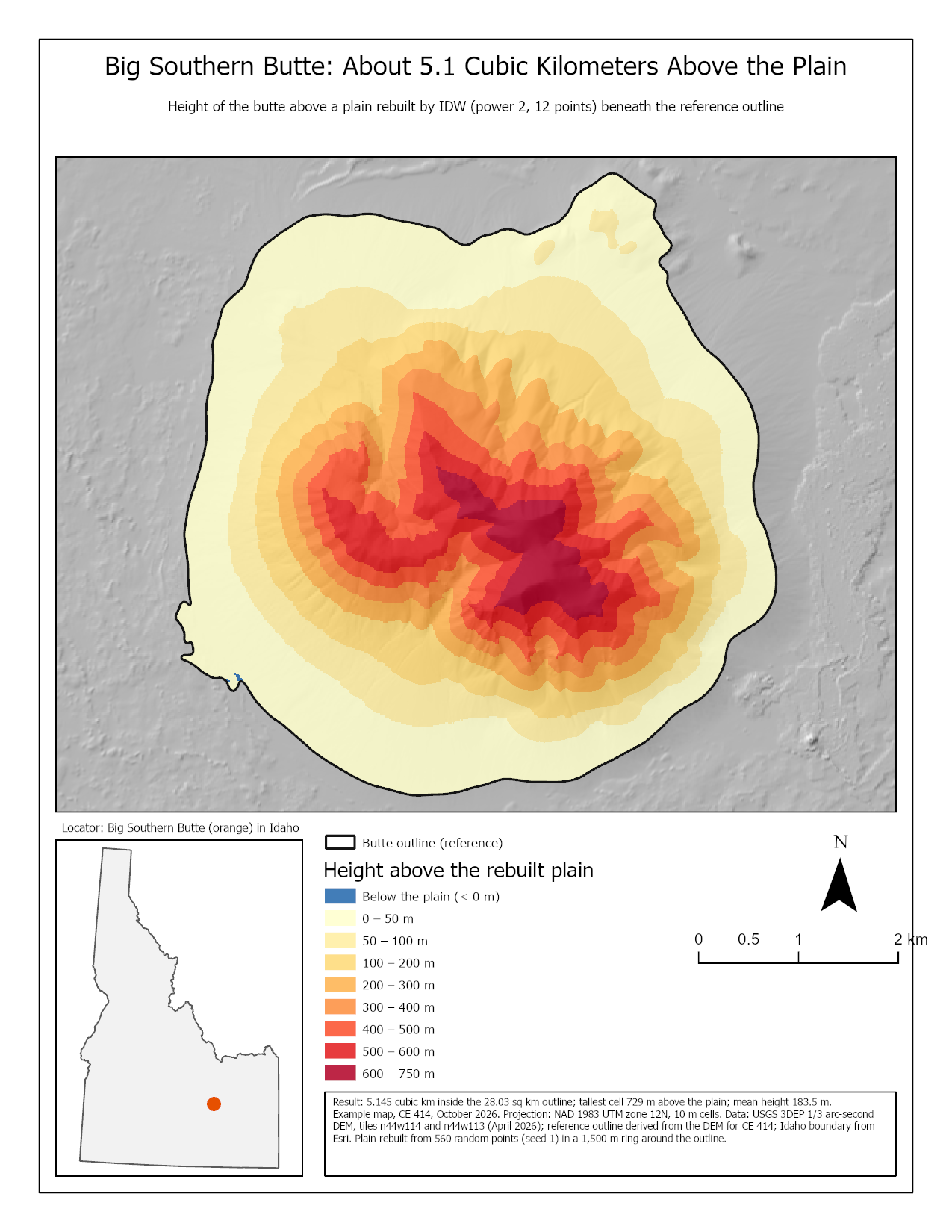
Figure 9. The baseline map. Two things to do better than this example: label the summit and one place on the plain, and show where the random points fell.
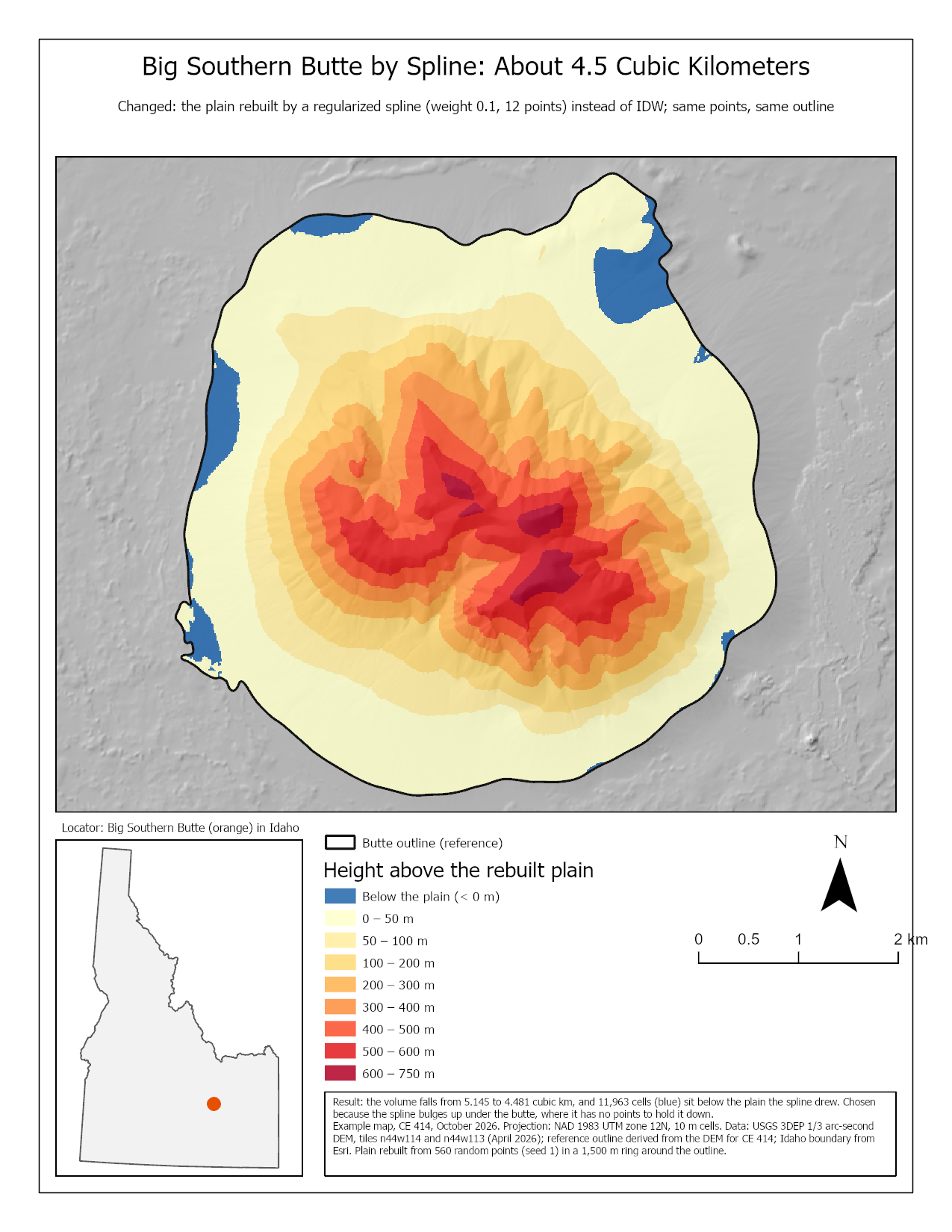
Figure 10. The kind of second map Step 9 asks for. Your own second map should be the run that most changes what a reader would conclude, which may not be this one.
Rubric for Big Southern Butte
Fifty points in five parts of ten. The bullets say what each part is worth, so you know exactly what to submit.
| Item | Points |
|---|---|
| Write-up (2–3 pages) • Assignment title, your name, date and course; your peer reviewer named, with a sentence on what you changed because of them (1) • The requirements of the project and your approach to solving it, in your own words (2) • The three metadata values for the DEM and what each means for your result (2) • Your check values from Steps 4 to 8 (2) • What the volume measures and what the model cannot see (Step 9, question 3) (2) • Organized writing, figures numbered and referred to, sources credited, rubric pasted with your self-assessment (1) |
/10 |
| ModelBuilder model — correct and working • The model runs end to end from its tool dialog and its baseline volume matches the check value (4) • A full-page model figure exported from ModelBuilder, all tools and datasets readable (2) • A screen capture of the tool dialog with the outline and the number of points exposed as parameters (2) • A description of the model a reader could repeat from (2) |
/10 |
| Map 1 — your baseline (full page, 8.5 × 11) • Title, with the volume in it or in a text box (1) • Neat line, north arrow and scale bar (1) • Text box with author, date, map projection, and the DEM's source and date (1) • Height above the plain in a clear color scale with a legend in meters (2) • The outline over a hillshade or imagery (1) • An inset locating the butte in Idaho (2) • Scale and legibility appropriate to the butte (2) |
/10 |
| Map 2 — one Step 9 scenario (full page, 8.5 × 11) • Title, with the volume in it or in a text box (1) • Neat line, north arrow and scale bar (1) • Text box with author, date, map projection, and the DEM's source and date (1) • Height above the plain in the same color scale as Map 1, with a legend (2) • The outline used, over a hillshade or imagery (1) • Title and text box say what changed from Map 1 and by how much (2) • Scale and legibility appropriate to the butte (2) |
/10 |
| Sensitivity (Step 9) • One table with the baseline and the four Step 9 runs (250 and 4,000 points, your own outline, the spline), with the points kept, the outline area, the volume, the tallest cell and the cells below the plain (4) • Which choice moves the volume most and least, ranked with your numbers (3) • What the spline did that IDW cannot, mapped and explained (3) |
/10 |
| Total | /50 |
Note
Using AI on this lab. Use AI freely to understand a tool, work out an error, or tighten your write-up, and add one line at the end of your report saying what you used it for. Do not take a field name, an expression, a coordinate system, or a number from it — those come from your own data, and the rubric asks you to defend every one. See the AI Use Policy for the full policy.